YA VPN Service in Kubernetes
Why
I had my beloved IPsec setup based on strongswan running in Kubernetes for a while — you can read about that here. It worked fine. I wasn’t looking to change it. Then a colleague pointed out WireGuard’s overhead numbers and I got curious enough to evaluate it myself.
WireGuard is a modern VPN protocol that lives in the Linux kernel. It’s designed to be simple, fast, and have a minimal attack surface compared to IPsec or OpenVPN. The numbers people throw around are impressive, but I wanted to see them in practice.
Key Generation
On macOS, install the tools via Homebrew:
brew install wireguard-toolsGenerate the server keys:
wg genkey > server_privatekey
wg pubkey < server_privatekey > server_publickey_me
Generate client keys:
wg genkey | tee me_privatekey | wg pubkey > me_publickeySimple and clean — much less ceremony than generating a PKI for IPsec.
Kubernetes Deployment
Namespace
apiVersion: v1
kind: Namespace
metadata:
  name: wireguard
  labels:
    name: wireguard
Service
I’m running this on a VPS so I’m using NodePort to expose the UDP port:
apiVersion: v1
kind: Service
metadata:
  name: wireguard
  namespace: wireguard
spec:
  type: NodePort
  ports:
    - port: 51820
      nodePort: 31820
      protocol: UDP
      targetPort: 51820
  selector:
    name: wireguard
The VPN becomes accessible at public_ip:31820.
Secrets
For testing I’m storing the WireGuard config in a Kubernetes Secret. In production you’d want something more robust, but this gets us going:
apiVersion: v1
kind: Secret
metadata:
  name: wireguard
  namespace: wireguard
type: Opaque
stringData:
  wg0.conf.template: |
    [Interface]
    Address = 172.16.18.0/20
    ListenPort = 51820
    PrivateKey = <server_privatekey>
    PostUp = iptables -A FORWARD -i %i -j ACCEPT; iptables -A FORWARD -o %i -j ACCEPT; iptables -t nat -A POSTROUTING -o ENI -j MASQUERADE
    PostUp = sysctl -w -q net.ipv4.ip_forward=1
    PostDown = iptables -D FORWARD -i %i -j ACCEPT; iptables -D FORWARD -o %i -j ACCEPT; iptables -t nat -D POSTROUTING -o ENI -j MASQUERADE
    PostDown = sysctl -w -q net.ipv4.ip_forward=0

    [Peer]
    #me
    PublicKey = <me_publickey>
    AllowedIPs = 172.16.18.10
The tunnel network is 172.16.18.0/20 and the client gets 172.16.18.10. Notice the ENI placeholder — that’s dynamically replaced at container startup.
Deployment
The interesting part here is the init container. WireGuard needs to know which network interface to use for masquerading, and that changes depending on the pod’s network environment. The init container figures it out dynamically:
apiVersion: apps/v1
kind: Deployment
metadata:
  name: wireguard
  namespace: wireguard
spec:
  selector:
    matchLabels:
      name: wireguard
  template:
    metadata:
      labels:
        name: wireguard
    spec:
      initContainers:
        - name: "wireguard-template-replacement"
          image: "busybox"
          command: ["sh", "-c", "ENI=$(ip route get 8.8.8.8 | grep 8.8.8.8 | awk '{print $5}'); sed \"s/ENI/$ENI/g\" /etc/wireguard-secret/wg0.conf.template > /etc/wireguard/wg0.conf; chmod 400 /etc/wireguard/wg0.conf"]
          volumeMounts:
            - name: wireguard-config
              mountPath: /etc/wireguard/
            - name: wireguard-secret
              mountPath: /etc/wireguard-secret/
      containers:
        - name: "wireguard"
          image: "linuxserver/wireguard:latest"
          ports:
            - containerPort: 51820
          env:
            - name: "TZ"
              value: "Europe/Rome"
            - name: "PEERS"
              value: "example"
          volumeMounts:
            - name: wireguard-config
              mountPath: /etc/wireguard/
              readOnly: true
          securityContext:
            privileged: true
            capabilities:
              add:
                - NET_ADMIN
      volumes:
        - name: wireguard-config
          emptyDir: {}
        - name: wireguard-secret
          secret:
            secretName: wireguard
      imagePullSecrets:
        - name: docker-registry
The emptyDir volume is the bridge between init container and main container — the init writes the resolved config there, and the main container reads it.
Verify It’s Running
kubectl get pods -n wireguard
NAME                         READY   STATUS    RESTARTS   AGE
wireguard-74ff66988d-ltwkq   1/1     Running   0          108m
Jump into the container and check WireGuard status:
kubectl exec -n wireguard -it deployment/wireguard -- bash
root@wireguard-74ff66988d-ltwkq:/# wg show
interface: wg0
  public key: Er7V4vxMEVBNZbqbDzHgXlYnZjSwrJYtwds86oOLLEg=
  private key: (hidden)
  listening port: 51820

peer: dfJjw5rdVNhmcIlDyFAXZI0rBQydsw9uqlh4kFJxBa0I=
  endpoint: 10.0.254.135:33851
  allowed ips: 172.16.18.10/32
  latest handshake: 5 minutes, 16 seconds ago
  transfer: 30.63 MiB received, 6.55 MiB sent
Client Configuration
I strongly recommend importing a config file rather than manually entering all the fields. Here’s the client config:
[Interface]
Address = 172.16.18.10/32
PrivateKey = <me_privatekey>
DNS = 1.1.1.1

[Peer]
PublicKey = <server_publickey_me>
AllowedIPs = 0.0.0.0/0, ::/0
Endpoint = <your-public-ip>:31820
Test and Results

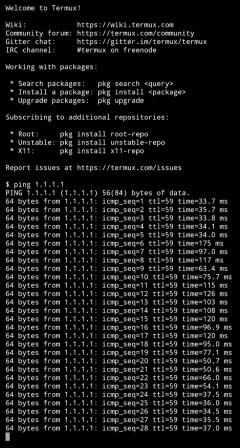
I ran a 1GB file download over the tunnel and monitored CPU and memory usage on the server side. The numbers were genuinely impressive — minimal CPU overhead, minimal memory footprint. This is where WireGuard earns its reputation. I’m really impressed by the efficiency of this tool. It’s another one for the swiss army knife.
UPDATE — Prometheus Monitoring Integration
After a while I added a monitoring sidecar so I could see WireGuard metrics in Grafana. The exporter is mindflavor/prometheus-wireguard-exporter.
First, add annotations to the pod so Prometheus scrapes it:
annotations:
  prometheus.io/scrape: "true"
  prometheus.io/path: "/metrics"
  prometheus.io/port: "9586"
Then add the exporter container alongside wireguard:
- name: "wg-exporter"
  image: "mindflavor/prometheus-wireguard-exporter:3.6.3"
  args: ["--prepend_sudo=true"]
  ports:
    - containerPort: 9586
  securityContext:
    privileged: true
    capabilities:
      add:
        - NET_ADMIN
        - NET_BIND_SERVICE
And the result in Grafana:
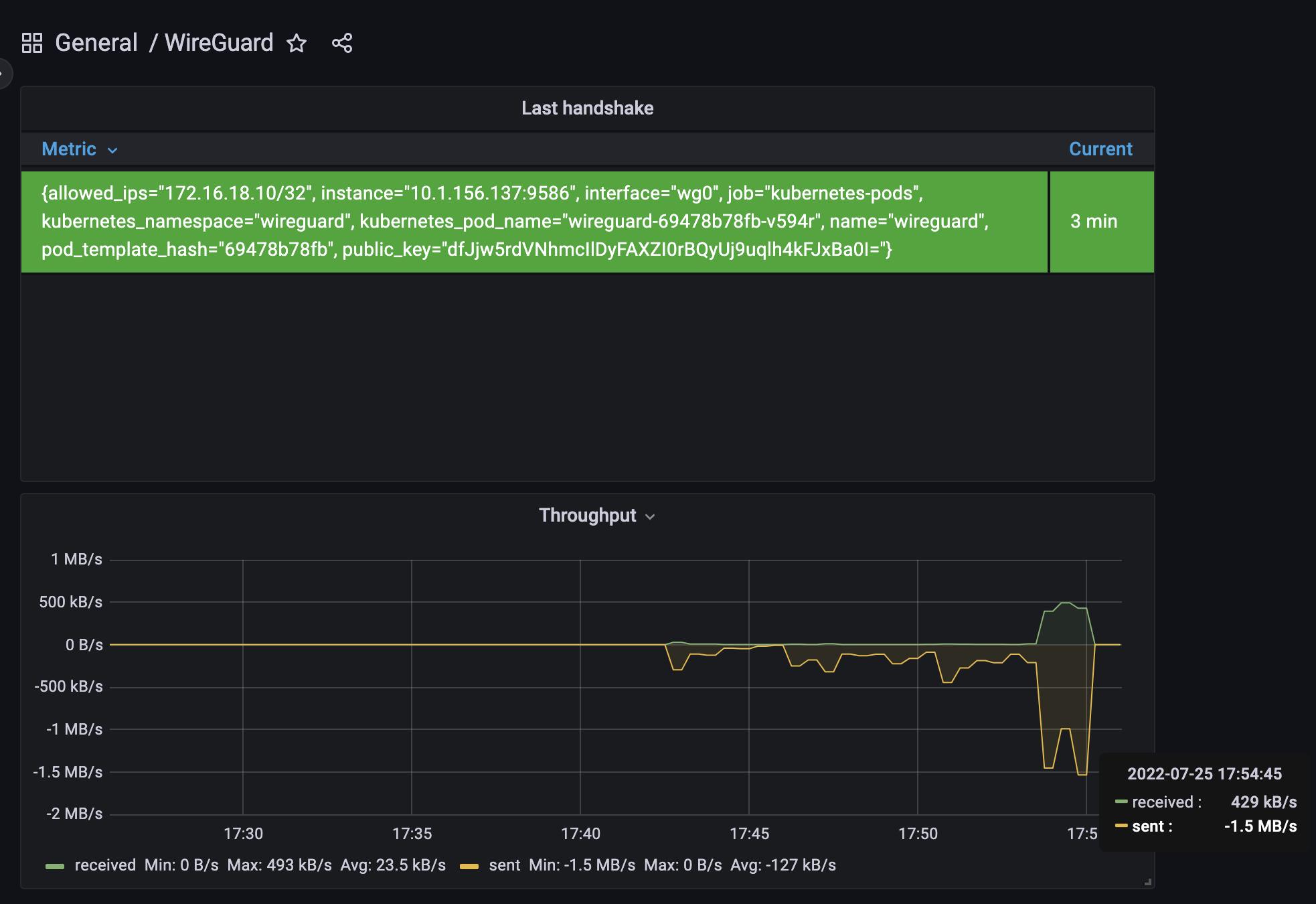
The full updated configuration with monitoring is in the monitoring branch of the repo. If you’re running WireGuard in Kubernetes and you’re not already watching transfer rates and handshake timestamps per peer, you’re flying blind. Add the exporter — it’s one container and a few annotations.