Scraping Through Cloudflare: How to Hide Behind Trusted IPs

Table of Contents
- Introduction
- The Police Uniform Analogy
- The Problem
- The Architecture
- The Proxy Worker
- Security Considerations
- Conclusion
Here we are.
Introduction
I love Cloudflare. I use it for all my projects. The free tier is generous, the API is clean, and the developer experience is miles ahead of competitors. If you’re building anything on the internet, Cloudflare should be your first stop.
But here’s the thing: Cloudflare’s trusted reputation can be used against you.
Not by Cloudflare. By people like me.
The Police Uniform Analogy
Think about a police officer. You see the uniform, the badge, the patrol car, and you assume authority, safety, legitimacy. The uniform signals “this person is trustworthy.”
But the uniform doesn’t guarantee anything. Anyone can buy a police uniform online. Anyone can print a badge. Anyone can put blue lights on a car. The uniform is a signal, not a guarantee.
Cloudflare IPs work the same way.
When you see 172.70.x.x or 104.16.x.x in your logs, your brain does the same thing: “Oh, that’s Cloudflare. It’s safe. It’s legitimate. It’s a real user behind a WAF.”
Strange… but is it?
The Problem
The assumption is: Cloudflare IP = legitimate traffic behind a WAF.
The reality: anyone can route traffic through Cloudflare’s network for free.
When I run a scraping service, I don’t scrape from my datacenter IP. That gets blocked immediately. Instead, I proxy my requests through a Cloudflare Worker. The target site sees Cloudflare’s IP, not mine. The request looks like it comes from a legitimate Cloudflare customer.
And here’s the behavioral trap: most sysadmins look at their logs, see Cloudflare ASNs, and move on. They don’t ask the one question that matters: if I don’t use Cloudflare, why am I seeing Cloudflare IPs in my logs?
That question never gets asked. And that’s exactly what makes this work.
The Architecture
The setup is straightforward:
The target site sees:
- Source IP: Cloudflare’s edge
- Headers: Clean, browser-like
- ASN: Cloudflare, Inc.
The target site does NOT see:
- My datacenter IP
- My real User-Agent
- My scraping infrastructure
And because it’s Cloudflare, the request passes WAF checks, bot detection, and IP reputation filters. It looks legitimate because it comes from a legitimate source.
The Proxy Worker
The Worker is the core. It proxies requests through Cloudflare’s network. The target sees Cloudflare’s IP. Here’s the full code:
export default {
  async fetch(request) {
    const url = new URL(request.url);

    // CORS preflight
    if (request.method === 'OPTIONS') {
      return new Response(null, {
        headers: {
          'Access-Control-Allow-Origin': '*',
          'Access-Control-Allow-Methods': 'GET, HEAD, POST, OPTIONS',
          'Access-Control-Allow-Headers': '*',
          'Access-Control-Max-Age': '86400',
        },
      });
    }

    // Get target URL from query string
    const targetUrl = url.searchParams.get('url');

    if (!targetUrl) {
      return new Response(
        JSON.stringify({
          error: 'Missing ?url= parameter',
          usage: url.origin + '?url=https://example.com',
        }),
        { status: 400, headers: { 'Content-Type': 'application/json' } }
      );
    }

    // Validate URL
    let parsedTarget;
    try {
      parsedTarget = new URL(targetUrl);
    } catch {
      return new Response(
        JSON.stringify({ error: 'Invalid URL provided' }),
        { status: 400, headers: { 'Content-Type': 'application/json' } }
      );
    }

    // Only allow HTTP(S)
    if (!['http:', 'https:'].includes(parsedTarget.protocol)) {
      return new Response(
        JSON.stringify({ error: 'Only HTTP/HTTPS URLs are allowed' }),
        { status: 400, headers: { 'Content-Type': 'application/json' } }
      );
    }

    // Create fresh headers without IP-leaking ones, with realistic browser fingerprint
    const proxyHeaders = new Headers();
    proxyHeaders.set('User-Agent', 'Mozilla/5.0 (Windows NT 10.0; Win64; x64) AppleWebKit/537.36 (KHTML, like Gecko) Chrome/120.0.0.0 Safari/537.36');
    proxyHeaders.set('Accept', 'text/html,application/xhtml+xml,application/xml;q=0.9,image/avif,image/webp,image/apng,*/*;q=0.8,application/signed-exchange;v=b3;q=0.7');
    proxyHeaders.set('Accept-Language', 'en-US,en;q=0.9');
    proxyHeaders.set('Accept-Encoding', 'gzip, deflate, br');
    proxyHeaders.set('sec-ch-ua', '"Not_A Brand";v="8", "Chromium";v="120", "Google Chrome";v="120"');
    proxyHeaders.set('sec-ch-ua-mobile', '?0');
    proxyHeaders.set('sec-ch-ua-platform', '"Windows"');
    proxyHeaders.set('Sec-Fetch-Dest', 'document');
    proxyHeaders.set('Sec-Fetch-Mode', 'navigate');
    proxyHeaders.set('Sec-Fetch-Site', 'none');
    proxyHeaders.set('Sec-Fetch-User', '?1');
    proxyHeaders.set('Upgrade-Insecure-Requests', '1');
    proxyHeaders.set('Connection', 'keep-alive');
    proxyHeaders.set('Cache-Control', 'max-age=0');
    proxyHeaders.set('X-Real-IP', '172.70.216.118');
    proxyHeaders.set('X-Forwarded-For', '172.70.216.118');

    const response = await fetch(targetUrl, {
      method: request.method,
      headers: proxyHeaders,
      body: request.method !== 'GET' && request.method !== 'HEAD' ? request.body : undefined,
    });

    // Clone response and add CORS headers
    const proxyResponse = new Response(response.body, response);
    proxyResponse.headers.set('Access-Control-Allow-Origin', '*');
    proxyResponse.headers.append('Vary', 'Origin');

    return proxyResponse;
  },
};
The key trick: setting X-Real-IP to a Cloudflare IP. Cloudflare uses this header to set Cf-Connecting-IP on subrequests to non-Cloudflare zones. Your real IP never touches the target.
Deploying the Worker
npx wrangler login
npx wrangler deploy
After deploy, the target site sees:
$ curl -s "https://proxy-edge-9c41f2b8.acme-labs.workers.dev/?url=https://httpbin.org/get"
{
  "args": {},
  "headers": {
    "Accept": "text/html,application/xhtml+xml,application/xml;q=0.9,image/avif,image/webp,image/apng,*/*;q=0.8,application/signed-exchange;v=b3;q=0.7",
    "Accept-Encoding": "gzip, br",
    "Accept-Language": "en-US,en;q=0.9",
    "Cache-Control": "max-age=0",
    "Cdn-Loop": "cloudflare; loops=1",
    "Cf-Ew-Via": "15",
    "Cf-Ray": "a3259ee90b5aee5c-MXP",
    "Cf-Visitor": "{\"scheme\":\"https\"}",
    "Cf-Worker": "acme-labs.workers.dev",
    "Host": "httpbin.org",
    "Sec-Ch-Ua": "\"Not_A Brand\";v=\"8\", \"Chromium\";v=\"120\", \"Google Chrome\";v=\"120\"",
    "Sec-Ch-Ua-Mobile": "?0",
    "Sec-Ch-Ua-Platform": "\"Windows\"",
    "Sec-Fetch-Dest": "document",
    "Sec-Fetch-Mode": "navigate",
    "Sec-Fetch-Site": "none",
    "Sec-Fetch-User": "?1",
    "Upgrade-Insecure-Requests": "1",
    "User-Agent": "Mozilla/5.0 (Windows NT 10.0; Win64; x64) AppleWebKit/537.36 (KHTML, like Gecko) Chrome/120.0.0.0 Safari/537.36",
    "X-Amzn-Trace-Id": "Root=1-6a91dd53-53e2edee0c0628ed4f7d0650"
  },
  "origin": "172.70.216.118,172.70.216.118, 172.69.68.124",
  "url": "https://httpbin.org/get"
}
No real IP. No datacenter ASN. Just Cloudflare, looking legitimate. The Cf-Worker header is still there because Cloudflare injects it on every subrequest, and it cannot be disabled. But your real IP? Gone. Your datacenter ASN? Gone. The only thing the target sees is a clean Chrome-on-Windows request coming from Cloudflare’s network.
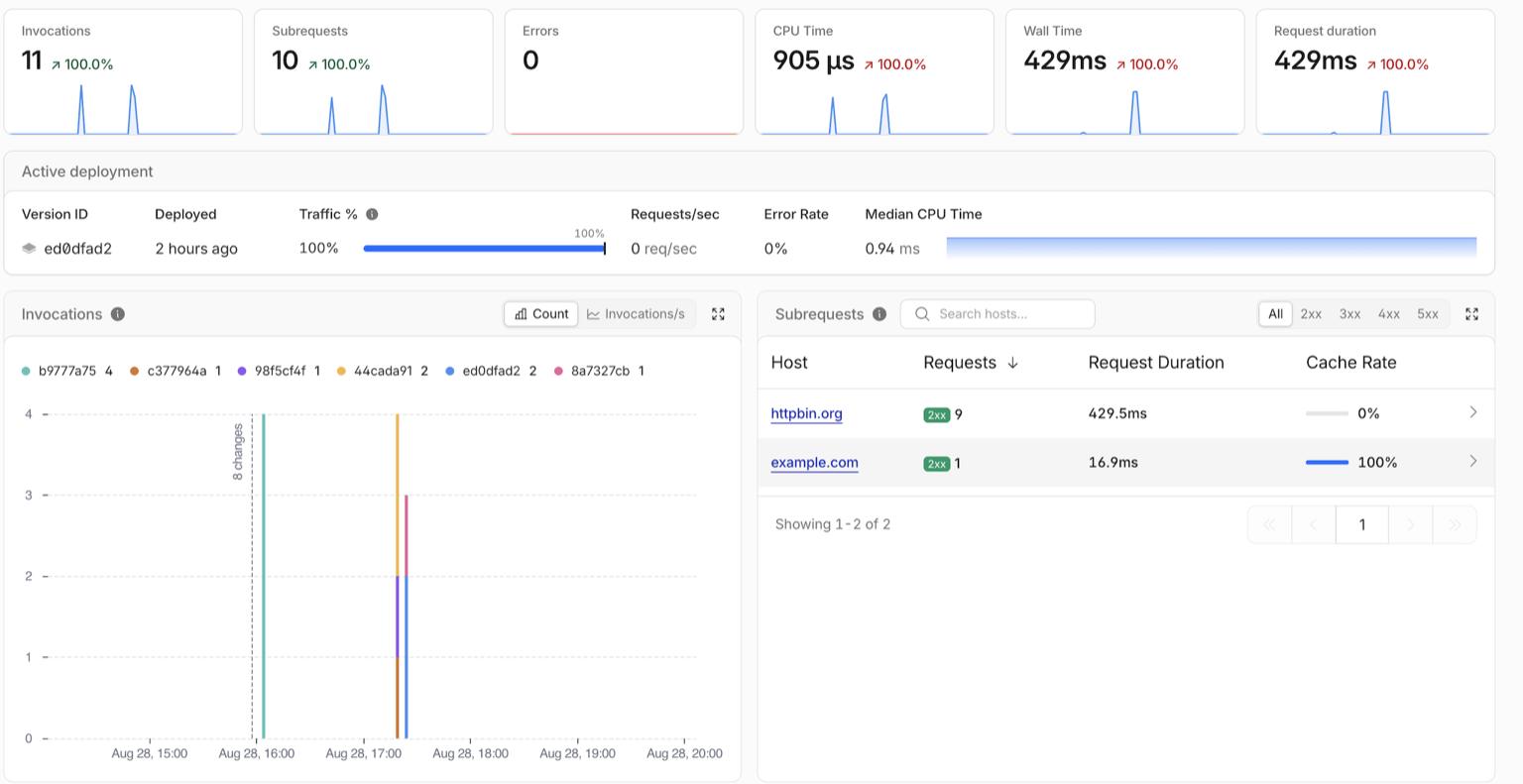
The Worker dashboard tells the whole story from my side: every invocation fans out into one subrequest to httpbin.org, zero errors, sub-millisecond CPU time. The scraping load is invisible to the target and cheap to run.
Security Considerations
1. The Trust Problem
Cloudflare IPs are trusted by default. This is a feature, not a bug. But it creates a blind spot: sysadmins see Cloudflare ASN and assume legitimacy.
The question nobody asks: if I don’t use Cloudflare, why am I seeing Cloudflare IPs in my logs?
If the answer is “I don’t know,” that’s a red flag.
2. Behavioral Analysis
IP reputation is not enough. You need behavioral analysis:
- Request patterns (too regular = bot)
- Session behavior (no cookies, no JS execution = scraper)
- Rate patterns (consistent intervals = automated)
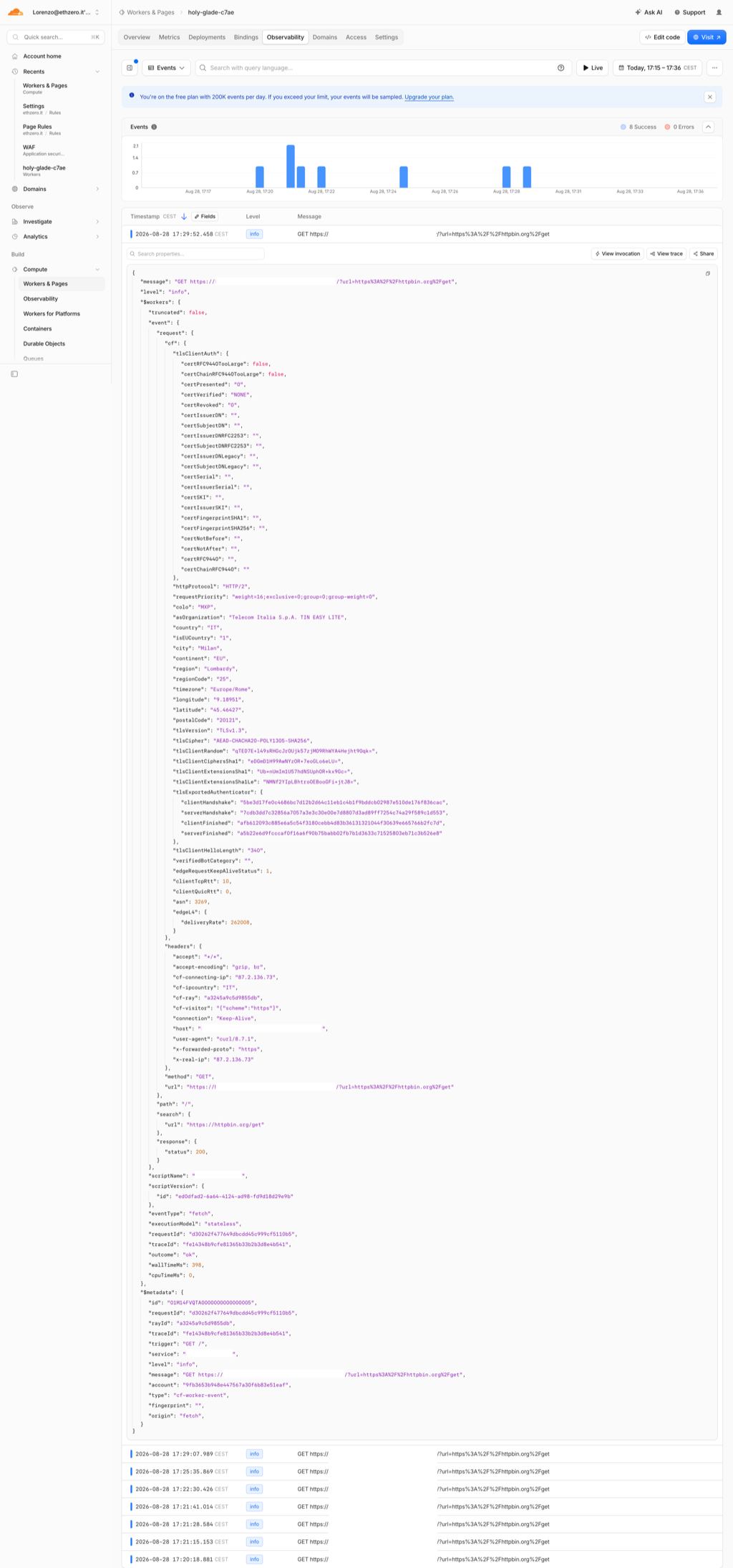
This is what the Worker itself logs for every inbound request: the full cf object, the client ASN, and a user-agent of curl/8.7.1 hitting the proxy. The target site never sees any of this. It only sees the clean request the Worker rebuilds. All the signal that would expose the scraper stops at Cloudflare’s edge.
Cloudflare’s WAF helps, but it’s designed for protection, not detection of its own users abusing the network.
3. The Real Defense
The only real defense against Cloudflare-proxied scraping:
- Challenge pages (CAPTCHA, JS challenges)
- Behavioral analysis beyond IP
- Rate limiting by fingerprint, not just IP
- Accept that some traffic will always look legitimate
4. Header Sanitization
The worker strips all identifying headers. No Cf-Connecting-Ip, no X-Forwarded-For with real IP, no datacenter User-Agent. The target sees a clean request from a Cloudflare IP. The only Cloudflare-injected header that remains is Cf-Worker, which Cloudflare adds on every subrequest and cannot be disabled, but it only reveals that the request went through a Worker, not who owns it.
5. Protocol Enforcement
Only HTTP/HTTPS allowed. No WebSocket, no FTP, no custom protocols. If it isn’t a web request, it doesn’t get through.
Conclusion
Cloudflare is an excellent WAF. I use it for everything. The API is clean, the free tier is generous, and the protection is solid.
But the trusted IP reputation can be abused. Anyone can proxy traffic through Cloudflare’s network. The target site sees a legitimate Cloudflare IP, and most sysadmins don’t ask the one question that matters: why am I seeing Cloudflare IPs when I don’t use Cloudflare?
The fix isn’t to distrust Cloudflare. The fix is to look beyond IP reputation. Behavioral analysis, challenge pages, and fingerprint-based rate limiting. Because a uniform doesn’t guarantee a cop, and a Cloudflare IP doesn’t guarantee a legitimate user.
If it isn’t there, it can’t break. But if it’s there and looks legitimate, it might not be what you think.