Maximum Yield with Minimum Expense
Great marketing quote in the title — but honestly, the underlying principle is always true: keep it simple, keep it safe.
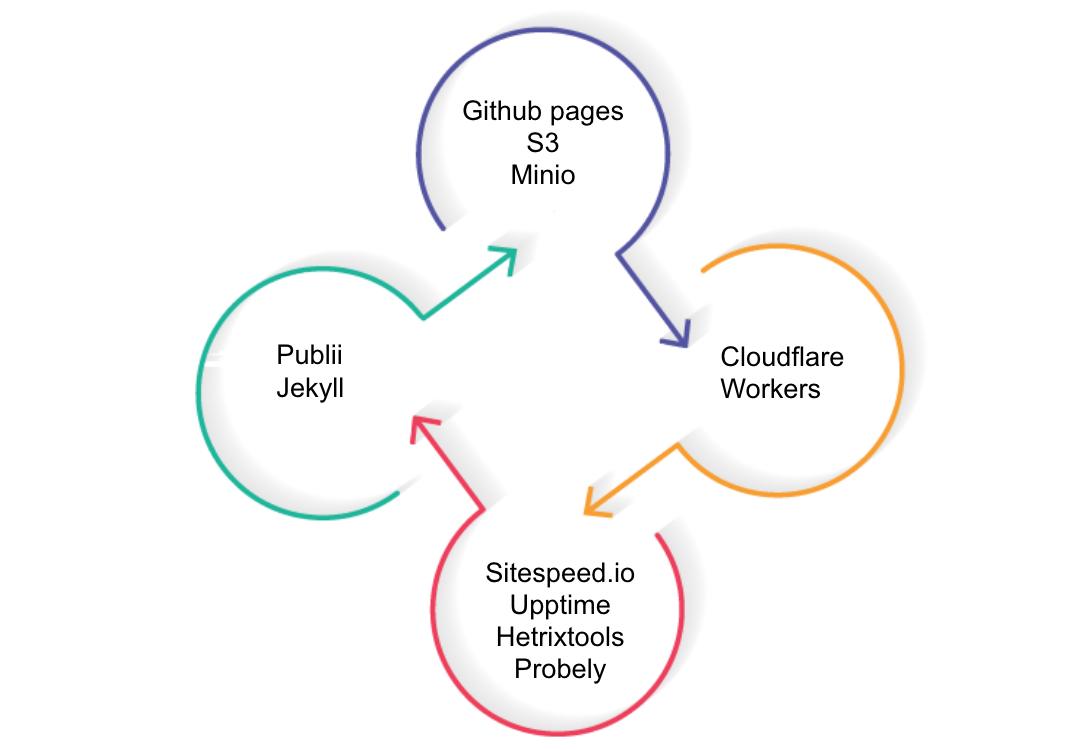
I want to structure this around four topics:
- Static website
- Tools
- Security
- Monitor
Each could be its own post. This one will cut across all of them because they’re connected.
This is not a post about how to create a blog. This post inspects some technology that can simplify your life or your work with small but important concepts.
Static Website
During my career I’ve tried pretty much all the famous open CMSes. Basically they’re web applications with SQL databases.
The problem with WordPress, Joomla, Drupal, and their relatives: since they’re open source and widely deployed, they’re constant vulnerability targets. Install plugins (and some of these CMSes can barely function without plugins) and the situation gets worse. More plugins = more bloat = worse performance. A huge percentage of the plugins in any CMS repository are old and unmaintained, yet still available to install.
If you don’t need something special and you want a static website for your company or your hobbies, the trend in enterprise is already moving from dynamic content to static because speed is the major KPI for a website. The static CMS ecosystem has matured:
- Jekyll
- Gatsby
- Siteleaf
- Netlify
- Hugo
- $whatever-js (every day there’s a new JS framework)
If you’re not particularly nerdy — or are tremendously lazy like me — a great alternative is Publii. WYSIWYG editor, easy to use, available for Windows/Linux/Mac.
Tools
Publii can store your HTML files in S3 or GitHub Pages. Let me talk about both.
GitHub Pages is free with a few limits:
- Published sites may be no larger than 1 GB
- Soft bandwidth limit of 100GB per month
- Soft limit of 10 builds per hour
Easy to use, security delegated to the GitHub account (always enable 2FA), free TLS/SSL, and custom domain support. For most personal and small business sites, this is the right answer.
S3-style storage as an alternative: This is where I get to use Kubernetes as an excuse. If you have a Minio instance running, you can use it as the backend. Here’s the complete deployment:
Namespace:
kind: "Namespace"
apiVersion: "v1"
metadata:
  name: "minio"
  labels:
    name: "minio"
Service:
apiVersion: v1
kind: Service
metadata:
  name: minio-svc
  namespace: minio
  labels:
    app: minio
spec:
  ports:
  - port: 9000
    protocol: TCP
  selector:
    app: minio
PersistentVolumeClaim (using microk8s host provisioner):
apiVersion: v1
kind: PersistentVolumeClaim
metadata:
  namespace: minio
  name: minio-pv-claim
  labels:
    app: minio-storage-claim
spec:
  storageClassName: microk8s-hostpath
  accessModes:
    - ReadWriteOnce
  resources:
    requests:
      storage: 1Gi
Deployment (use secrets instead of hardcoding credentials):
kind: Deployment
metadata:
  name: minio-deployment
  namespace: minio
spec:
  selector:
    matchLabels:
      app: minio
  strategy:
    type: Recreate
  template:
    metadata:
      labels:
        app: minio
    spec:
      volumes:
      - name: storage
        persistentVolumeClaim:
          claimName: minio-pv-claim
      containers:
      - name: minio
        image: minio/minio:latest
        args:
        - server
        - /storage
        env:
        - name: MINIO_ACCESS_KEY
          value: "$something"
        - name: MINIO_SECRET_KEY
          value: "$somethingsecret"
        - name: MINIO_DOMAIN
          value: minio.h4x0r3d.lan
        ports:
        - containerPort: 9000
          hostPort: 9000
        volumeMounts:
        - name: storage
          mountPath: "/storage"
Ingress:
kind: Ingress
metadata:
  name: minio-ingress
  namespace: minio
  annotations:
    kubernetes.io/ingress.class: nginx
    nginx.org/client-max-body-size: 1000m
    ingress.kubernetes.io/proxy-body-size: 1000m
spec:
  rules:
  - host: minio.h4x0r3d.lan
    http:
      paths:
      - path: /
        backend:
          serviceName: minio-svc
          servicePort: 9000
One important note: an object storage is NOT a web server. You need an Apache or nginx layer in front to serve the site properly:
<VirtualHost *:80>
  ServerAdmin [email protected]
  DocumentRoot /usr/local/apache2/htdocs/
  ServerName www.k8s.it
  ErrorLog logs/www.k8s-error_log
  CustomLog logs/www.k8s-access_log combined
  LoadModule rewrite_module modules/mod_rewrite.so
  ProxyRequests Off
  ProxyPass / http://minio-svc.minio.svc.cluster.local:9000/blog/
  RewriteEngine on
  RewriteRule ^(.*)/$ /$1/index.html [PT,L]
</VirtualHost>
Again — keep it simple. There’s no universally right solution. I’m still using GitHub Pages because it’s free, covers my needs, and it’s serverless.
Security
Even with GitHub handling the underlying security, why not add a layer on top?
Second pillar: keep it safe.
I really appreciate Cloudflare’s free plan. I’ve already written about configuring a website with Cloudflare using Terraform here.
Even if we’re covered by attacks because it’s a static webpage, and we’ve added Cloudflare protection, we can add some cosmetic security features that improve compliance posture in 2020.
GitHub Pages and S3 are not web servers, so how do we introduce security headers? Cloudflare Workers — serverless functions that run on every request.
The code (reference: https://scotthelme.co.uk/security-headers-cloudflare-worker/) adds headers via a serverless function:
const securityHeaders = {
  "Content-Security-Policy": "upgrade-insecure-requests",
  "Strict-Transport-Security": "max-age=3600",
  "X-Xss-Protection": "1; mode=block",
  "X-Frame-Options": "DENY",
  "X-Content-Type-Options": "nosniff",
  "Permissions-Policy": "geolocation=()",
  "Referrer-Policy": "strict-origin-when-cross-origin"
};

async function addHeaders(req) {
  const response = await fetch(req),
    newHeaders = new Headers(response.headers),
    setHeaders = Object.assign({}, securityHeaders);

  if (newHeaders.has("Content-Type") && !newHeaders.get("Content-Type").includes("text/html")) {
    return new Response(response.body, {
      status: response.status,
      statusText: response.statusText,
      headers: newHeaders
    });
  }

  Object.keys(setHeaders).forEach(name => newHeaders.set(name, setHeaders[name]));

  return new Response(response.body, {
    status: response.status,
    statusText: response.statusText,
    headers: newHeaders
  });
}

addEventListener("fetch", event => event.respondWith(addHeaders(event.request)));
Add the worker to the main route and you’re done. Note that Strict-Transport-Security has a low max-age value here, but that’s acceptable for now.
Cloudflare’s free plan limits Workers to 100k requests/day and 1k/min — more than enough for a personal blog.
OKR summary:
- Website managed with no database
- Serverless hosting with free options
- Overall protection from Cloudflare
- Security headers from Cloudflare Workers, also serverless
Monitor
What’s missing?
A bit of awareness.
Are we safe? Maybe — but better to get an external opinion. Probely has a good free plan for vulnerability scanning.

For performance monitoring, I already wrote about sitespeed.io in Kubernetes.
For uptime monitoring, upptime uses GitHub Actions to create a monitoring system like https://lorenzogirardi.github.io/status/.
Another option is hetrixtools — free for up to 15 probes, monitoring websites and SMTP with alerting via Telegram bot, email, and SMS.
Technology at its best: minimal expense, maximum yield, serverless everywhere.