Kubernetes VPN Strongswan — IPsec with LDAP Auth

How to Manage VPN in a Kubernetes Environment
Traditional IPsec-XAuth VPN manages credentials in flat files. Adding a user means editing a file and redeploying. Removing a user means the same. In a Kubernetes environment, that’s not acceptable.
This implementation integrates Strongswan with LDAP, turning VPN access into a standard directory operation — the same system that manages every other credential in the organization.
Architecture
Three components:
- Kubernetes — container orchestration
- Strongswan — IPsec-XAuth VPN daemon
- LDAP — Active Directory, OpenLDAP, or FreeIPA
Authentication flow: client → Strongswan → PAM → LDAP. No credential files. No redeployment for user changes.
Why LDAP?
Most enterprises already run LDAP. It provides:
- Password expiration policies
- Complexity requirements
- Group-based access control
- Centralized user lifecycle management
The VPN becomes another application that delegates auth to the directory — consistent with everything else.
LDAP Configuration
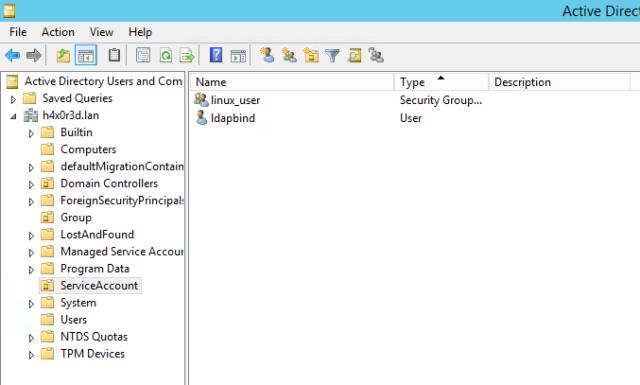
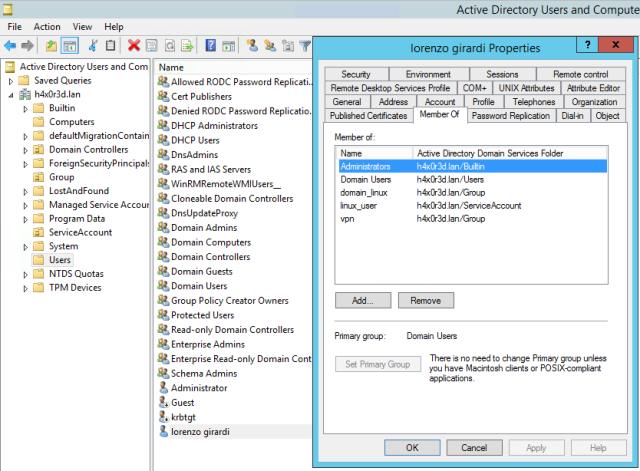
Two LDAP elements required:
- Technical bind user (
ldapbind) — low-privilege account for querying the directory - VPN group (
vpn) — group membership determines VPN access eligibility
Docker Image
FROM debian:stretch
MAINTAINER lgirardi <[email protected]>

RUN apt-get -y update && apt-get -yq install \
        strongswan \
        libcharon-extra-plugins \
        iptables \
        kmod \
        libpam-ldap \
        vim

EXPOSE 500/udp 4500/udp

CMD /usr/sbin/ipsec start --nofork
Key packages: libpam-ldap (LDAP PAM module) and libcharon-extra-plugins (XAuth support).
Kubernetes Configuration
Environment variables don’t propagate to Strongswan child processes, so everything goes through ConfigMaps and Secrets mounted as files.
ConfigMap — non-sensitive config
apiVersion: v1
kind: ConfigMap
metadata:
  name: strongswanconfigmap
  namespace: strongswan
data:
  ipsec.conf: |
    config setup
      charondebug="ike 1, knl 1, cfg 0"
    conn %default
      ikelifetime=60m
      keylife=20m
      rekeymargin=3m
      keyingtries=1
      authby=xauthpsk
      xauth=server
      keyexchange=ikev1
    conn roadwarrior
      left=%defaultroute
      leftsubnet=10.0.0.0/8
      leftfirewall=yes
      right=%any
      rightdns=8.8.8.8
      rightsourceip=10.10.10.0/24
      auto=add

  xauth-pam.conf: |
    xauth-pam {
      load = yes
    }

  attr.conf: |
    attr {
      split-include = 10.0.0.0/8
      load = yes
    }

  ipsec: |
    auth required pam_ldap.so
Secrets — sensitive config
apiVersion: v1
kind: Secret
metadata:
  name: strongswan-secret
  namespace: strongswan
type: Opaque
data:
  psk: <base64-encoded-psk>
  pamldap: <base64-encoded-pam-ldap-conf>
Deployment with volume mounts
volumeMounts:
  - name: psk
    mountPath: /etc/ipsec.secrets
    subPath: psk
    readOnly: true
  - name: pamldap
    mountPath: /etc/pam_ldap.conf
    subPath: pamldap
  - name: strongswan-attr
    mountPath: /etc/strongswan.d/charon/attr.conf
    subPath: attr.conf
  - name: strongswan-xauth-pam
    mountPath: /etc/strongswan.d/charon/xauth-pam.conf
    subPath: xauth-pam.conf
  - name: strongswan-ipsec
    mountPath: /etc/pam.d/ipsec
    subPath: ipsec
  - name: strongswan-ipseconf
    mountPath: /etc/ipsec.conf
    subPath: ipsec.conf

volumes:
  - name: strongswan-attr
    configMap:
      name: strongswanconfigmap
      items:
        - key: attr.conf
          path: attr.conf
  - name: strongswan-xauth-pam
    configMap:
      name: strongswanconfigmap
      items:
        - key: xauth-pam.conf
          path: xauth-pam.conf
  - name: strongswan-ipsec
    configMap:
      name: strongswanconfigmap
      items:
        - key: ipsec
          path: ipsec
  - name: strongswan-ipseconf
    configMap:
      name: strongswanconfigmap
      items:
        - key: ipsec.conf
          path: ipsec.conf
  - name: psk
    secret:
      secretName: strongswan-secret
  - name: pamldap
    secret:
      secretName: strongswan-secret
Network Requirements
The service uses NodePort to expose IPsec ports:
spec:
  type: NodePort
  ports:
    - name: isakmp-udp
      protocol: UDP
      nodePort: 30500
      port: 500
      targetPort: 500
    - name: ipsec-nat-t
      protocol: UDP
      nodePort: 30450
      port: 4500
      targetPort: 4500
Firewall rules must permit UDP 30500 and 30450 to the Kubernetes node.

Deployment
kubectl apply -f deploy/
kubectl get pods -n strongswan
NAME READY STATUS RESTARTS AGE
strongswan-77bfbb9f9f-57hmz 1/1 Running 0 22hClient Configuration
Standard IPsec clients work: Cisco IPsec client, native iOS/macOS VPN, Android IPsec clients.
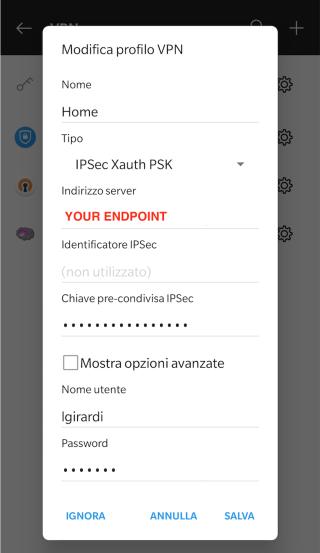
Configuration: gateway = Kubernetes node IP, authentication = PSK + username/password.


Verification
Successful LDAP authentication in Strongswan logs:
11[IKE] PAM authentication of 'lgirardi' successful
11[IKE] XAuth authentication of 'lgirardi' successful
12[IKE] IKE_SA roadw[1] established between 10.1.1.84...10.1.1.1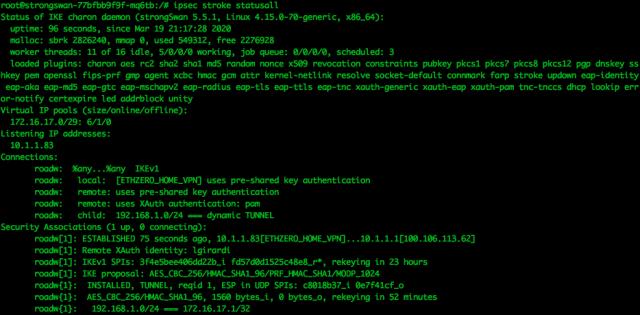
Conclusion
LDAP integration removes the operational burden of VPN credential management. Adding a user: create an LDAP account, add to the vpn group — done. Removing a user: disable or delete the LDAP account — done. No Kubernetes secrets to update. No pod restarts.
The VPN becomes a standard application in the directory, consistent with every other enterprise service.