Kubernetes Service Mesh

Do we need a service mesh? A few years ago I started evaluating this feature for existing infrastructure. There are many concepts to consider, and many mistakes people commonly make in thinking about what service mesh does.
Better to start with what a service mesh is NOT.
What a Service Mesh Is NOT
- Not an API gateway (though they may share some components)
- Not the location for firewall rules
- Not a magical application performance booster
- Not something to add without a clear scope — if you do, it could create disorder
What a Service Mesh IS
The short answer covers four areas:
- The missing link in infrastructure observability
- A structured approach to application routing
- Internal rate limiting and infrastructure-level anti-DDoS (requiring careful implementation)
- A way to improve certain application limitations
When Does It Actually Add Value?
Adding a service mesh isn’t a simple yes/no decision. You need to evaluate your company’s microservices maturity.
Rate Limiting
Internal rate limiting can protect infrastructure during cascading failure scenarios. But here’s the catch: in a synchronous architecture without decoupling, rate limiting may simply stop request serving and propagate the problem downstream instead of containing it.
The maintenance question matters too: who maintains rate limit values? This should integrate with deployment pipelines and correlate with application scope. In an infrastructure with 200+ microservices, this creates substantial challenges — projects losing ownership, poorly maintained services becoming “new legacy,” new teams inheriting old configurations they don’t understand.
My view: use it in specific, “strategic” applications. Do not add it indiscriminately to the whole infrastructure.
Routing
Routing in a service mesh functions as detailed, customizable blue-green deployment. This proves valuable when deploying new production features where canary deployment doesn’t give you enough granularity for business measurement.
The genuinely useful feature here is microservice affinity. Consider an application “Pippo” using cache “Paperino”:
- Pippo: 10-pod namespace
- Paperino: 6-pod cache with replication/sharding across 2 availability zones
A service mesh lets you direct Pippo to use only the Paperino pods in its local availability zone. The roundtrip latency improvement is dramatic.
Network Security
For network policies and firewall rules, “the right answer is Cilium.”
Summary
“A service mesh gives you great value only if your infrastructure is able to embrace it, and only if you know what you’re doing with that infrastructure.”
Key value areas: observability, routing (strictly related to microservice architecture), rate limiting.
The Lab
Here’s a sample lab to discover and test these features hands-on.
Setup
Tools:
- minikube v1.6.2
- Kubernetes v1.17.0 on Docker 19.03.5
curl -Lo minikube https://storage.googleapis.com/minikube/releases/latest/minikube-linux-amd64
chmod +x minikube
sudo install minikube /usr/local/bin/
minikube start --memory=3000 --cpus=3
Since production uses flannel (which can’t manage network policy), I’m starting without CNI to create an environment closer to real conditions.
Architecture
Four namespaces:
- a — traefik (ingress): Ingress controller
- b — apache: Apache instance handling rewrite rules
- c — application: Python app connected to Redis, providing
/setand/getendpoints - d — redis: Redis database backend
Application Code
from os import environ
from datetime import datetime
import json
import redis
from flask import Flask, redirect

VERSION = "1.1.1"
REDIS_ENDPOINT = environ.get("REDIS_ENDPOINT", "redis-svc.d-redis.svc.cluster.local")
REDIS_PORT = int(environ.get("REDIS_PORT", "6379"))

APP = Flask(__name__)

@APP.route("/")
def redisapp():
    return redirect("/get", code=302)

@APP.route("/set")
def set_var():
    red = redis.StrictRedis(host=REDIS_ENDPOINT, port=REDIS_PORT, db=0)
    red.set("time", str(datetime.now()))
    return json.dumps({"time": str(red.get("time"))})

@APP.route("/get")
def get_var():
    red = redis.StrictRedis(host=REDIS_ENDPOINT, port=REDIS_PORT, db=0)
    return json.dumps({"time": str(red.get("time"))})

@APP.route("/reset")
def reset():
    red = redis.StrictRedis(host=REDIS_ENDPOINT, port=REDIS_PORT, db=0)
    red.delete("time")
    return json.dumps({"time": str(red.get("time"))})

@APP.route("/version")
def version():
    return json.dumps({"version": VERSION})

@APP.route("/healthz")
def health():
    try:
        red = redis.StrictRedis(host=REDIS_ENDPOINT, port=REDIS_PORT, db=0)
        red.ping()
    except redis.exceptions.ConnectionError:
        return json.dumps({"ping": "FAIL"})
    return json.dumps({"ping": red.ping()})

@APP.route("/readyz")
def ready():
    return health()

if __name__ == "__main__":
    APP.run(debug=True, host="0.0.0.0")
Folder Structure
kubernetes/
├── 00-traefik
│   ├── A-00-traefik-ns.yaml
│   ├── A-01-traefik-rbac.yaml
│   └── A-02-traefik-ds.yaml
├── 01-apache
│   ├── B-00-k8s-apacherr-ns.yaml
│   ├── B-01-k8s-apacherr-svc.yaml
│   ├── B-02-k8s-apacherr-ing.yaml
│   ├── B-03-k8s-apacherr-dpl.yaml
│   └── B-04-k8s-apacherr-cfm.yaml
├── 02-redis
│   ├── D-00-lab-redis-ns.yaml
│   ├── D-01-lab-redis-svc.yaml
│   └── D-02-lab-redis-dpl.yaml
└── 03-app
    ├── C-00-app-ns.yaml
    ├── C-01-app-svc.yaml
    └── C-02-app-dpl.yaml
Deploy Everything
kubectl apply -f 00-traefik/
kubectl apply -f 01-apache/
kubectl apply -f 02-redis/
kubectl apply -f 03-app/
Verify:
kubectl get po --all-namespaces

NAMESPACE           NAME                               READY   STATUS    RESTARTS
a-ingress-traefik   traefik-ingress-controller-jkppg   1/1     Running   0
b-apacherr          apacherr-8b786b45d-g9vcl           1/1     Running   0
c-app-count         pythonapp-555d6d88cd-slhfb         1/1     Running   0
d-redis             redis-b869b89d-pf6ms               1/1     Running   0
Test the Flow
Initialize Redis:
$ curl http://pippo.lan/count/set
{"time": "b'2019-12-28 20:06:33.919059'"}
Case 1 — traefik → apache → app → redis (full stack):
$ curl http://pippo.lan/count/get
{"time": "b'2019-12-28 20:06:33.919059'"}
Case 2 — traefik → apache → redis (bypassing the app):
$ curl http://pippo.lan/redis/GET/time
{"GET":"2019-12-28 20:06:33.919059"}
Network Policy with Cilium
The goal: restrict namespace d-redis to accept connections only from namespace c-app-count. Expected result: Case 1 still works, Case 2 fails.
Cilium network policy:
apiVersion: networking.k8s.io/v1
kind: NetworkPolicy
metadata:
  name: isolate-namespace
  namespace: d-redis
spec:
  podSelector: {}
  policyTypes:
  - Ingress
  - Egress
  ingress:
  - from:
    - namespaceSelector:
        matchLabels:
          name: c-app-count
  egress:
  - to:
    - namespaceSelector:
        matchLabels:
          name: c-app-count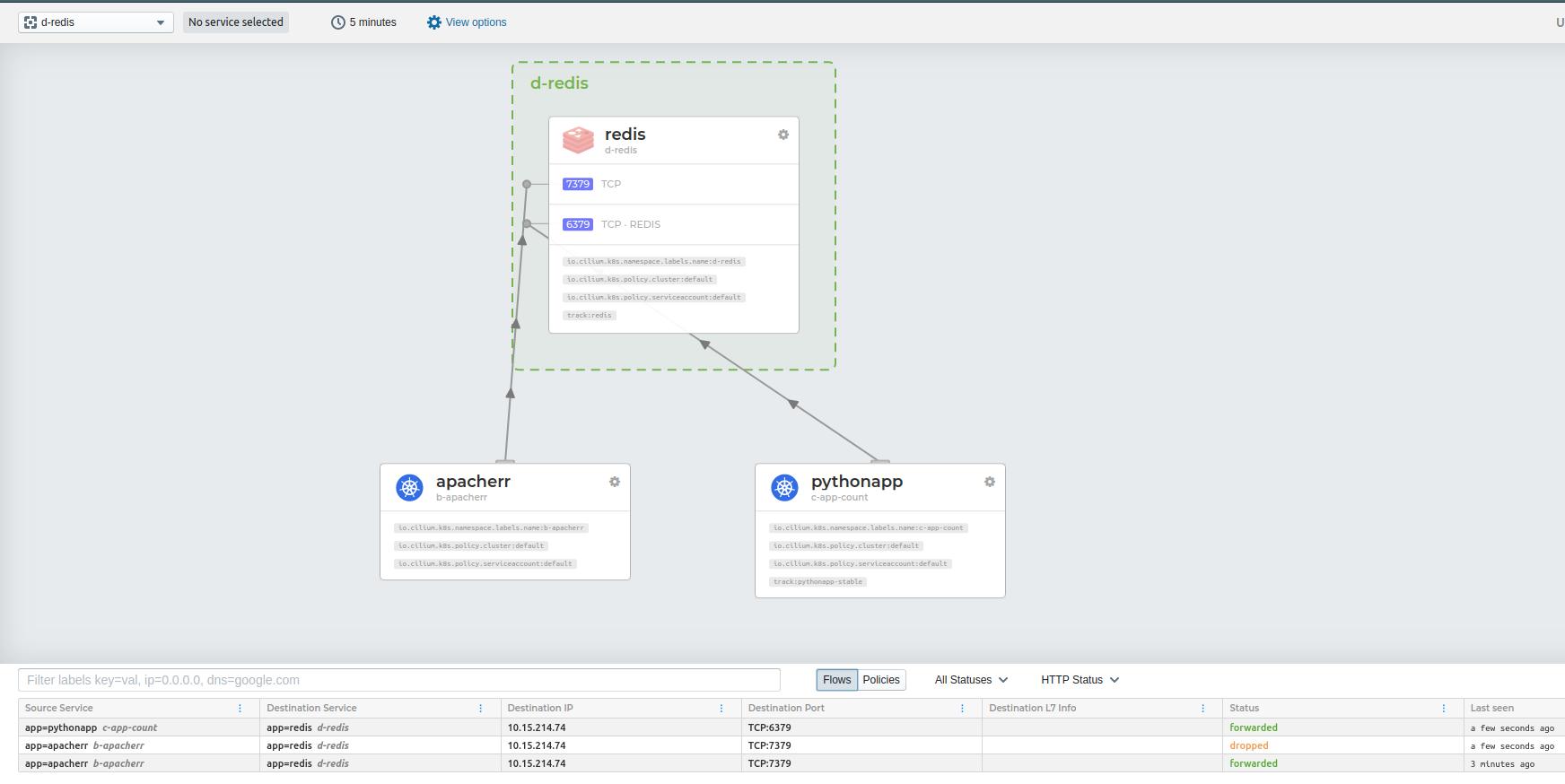
Hubble shows the dropped traffic visually. With the policy applied, Case 2 gets blocked at the network level — no application changes, no firewall rules on the host, just Kubernetes-native network policy enforced by Cilium.
Istio Observability
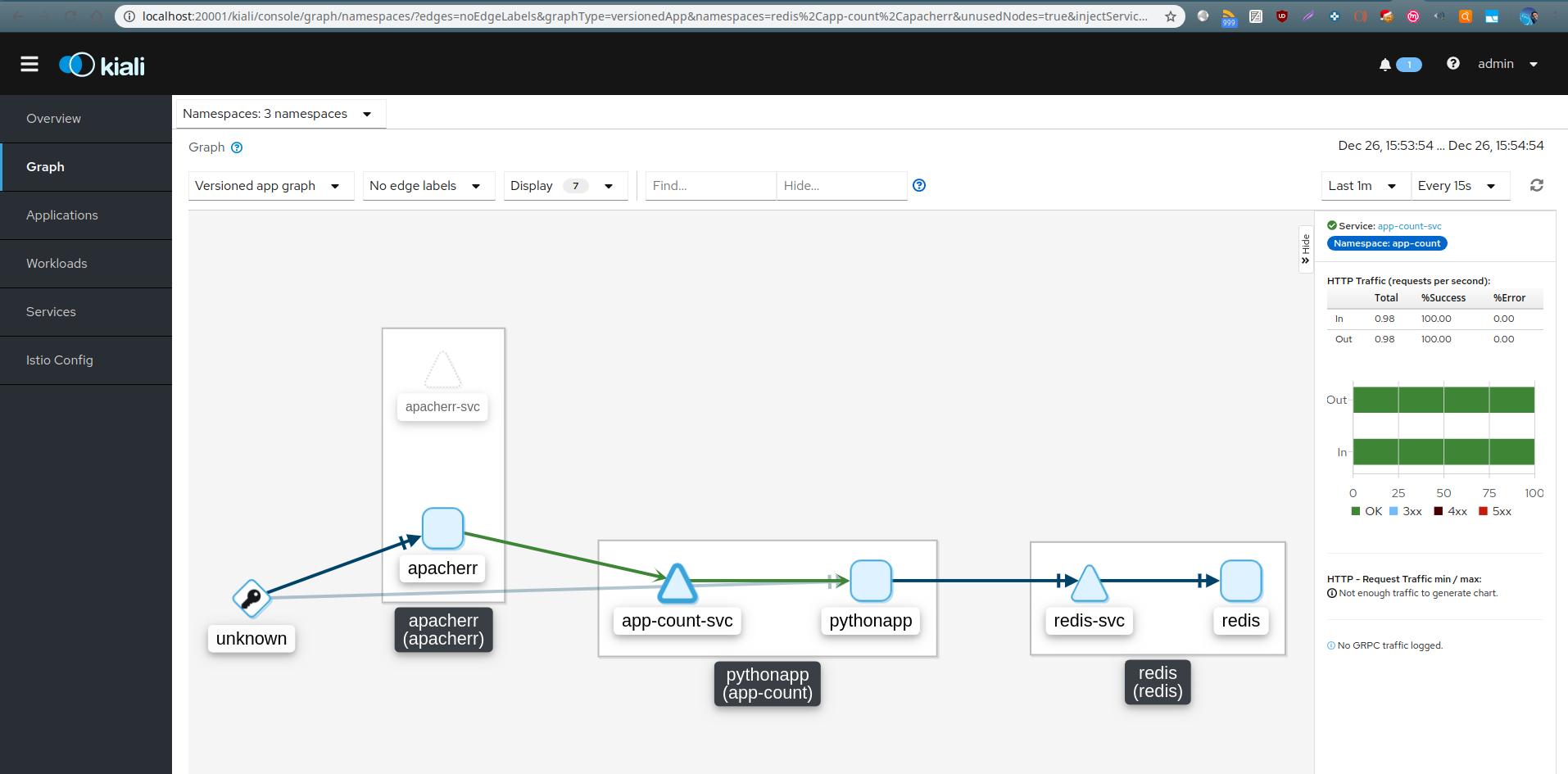
Istio with Kiali provides the service topology view — exactly the observability piece that’s genuinely hard to get any other way. When you have dozens of microservices and something is degrading, having a visual map of service-to-service traffic with latency and error rates is invaluable.
Conclusion
Service mesh is worth it — but only if you’re ready for it. The observability case is the strongest argument. The routing case is compelling for specific microservice affinity problems. The rate limiting case needs careful thought before enabling broadly.
Add it when you know what you’re getting. Don’t add it because everyone else seems to be.