Kubernetes Postfix
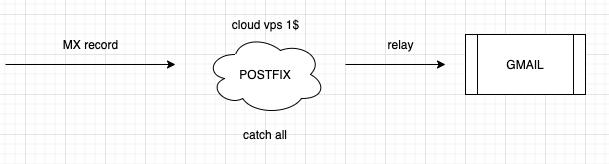
Long story short: my VPS provider changed the price for their small instance from $1 to $3, so I took the opportunity to move my Postfix service from cloud to on-premises. Why move away from cloud when the rest of the world is moving toward it? Because my own domain is used primarily for alerting, and the cost/benefit stopped making sense at $3/month.
Yes, I lose a static IP and PTR DNS capabilities. For a personal domain used for alerting, that’s an acceptable trade-off.
What Email Actually Involves
Sending email sometimes requires dedicated work even in enterprise companies. Beyond the infrastructure, there’s domain segmentation strategy and ISP spam thresholds to consider.
The key technologies:
- TLS — encrypted connection in transit
- Sender-ID — primarily for the Microsoft ecosystem
- PTR record — verifies SMTP host identity (reverse DNS)
- SPF record — TXT record whitelisting authorized SMTP servers
- DKIM — private/public certificate pair linking your SMTP server to your domain
- DMARC — combines SPF and DKIM for domain-level protection
For my setup at example.com:
- Receive email from and to the domain
- Implement a catchall system (no individual account configuration needed)
- Relay all email to Gmail
- Reject email going to domains outside my chosen set
The configuration relies on Postfix’s virtual and transport maps.
Implementation in Kubernetes
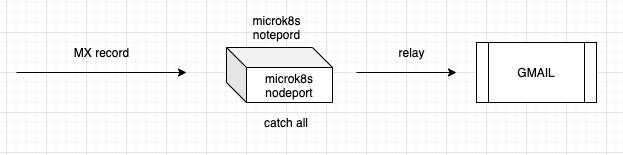
The architecture migration was simple: change the MX record to point to my home IP.
Scenarios
There are several ways to package this:
- Scenario 1: Dedicated images for each component (postfix, rsyslog, opendkim, TLS)
- Scenario 2: Ingress TCP forward with TLS via cert-manager
- Scenario 3: External storage for logs
- Scenario Lazy: Single container with all components using NodePort
I went with Scenario Lazy — one standalone Kubernetes node, one container, NodePort for external exposure. Good enough.
Dockerfile
FROM debian:buster
MAINTAINER lgirardi <[email protected]>

EXPOSE 25/tcp

RUN apt-get -y update && apt-get -yq install \
    postfix \
    bsd-mailx \
    opendkim \
    opendkim-tools \
    sasl2-bin \
    rsyslog \
    supervisor

ADD run.sh /opt/run.sh

CMD /opt/run.sh;/usr/bin/supervisord -c /etc/supervisor/supervisord.conf
run.sh manages the supervisord daemon for postfix, rsyslog, and opendkim processes. Supervisord is the right tool here — it handles process supervision for multiple services in a single container.
Configuration Management
All configuration lives in ConfigMaps and Secrets. This is the right approach for this kind of service — you tune postfix behavior without rebuilding images. Rebuilding images on every config change makes no sense.
The deployment injects all configuration files:
apiVersion: apps/v1
kind: Deployment
metadata:
  name: postfix
  namespace: postfix
spec:
  replicas: 1
  strategy:
    type: RollingUpdate
  revisionHistoryLimit: 10
  selector:
    matchLabels:
      app: postfix
  template:
    metadata:
      labels:
        app: postfix
    spec:
      containers:
      - name: postfix
        image: lgirardi/kubernetes-postfix:v0.2
        lifecycle:
          postStart:
            exec:
              command: [ "bin/bash", "-c", "postmap /etc/postfix/virtual && postmap /etc/postfix/transport && supervisorctl restart postfix" ]
        securityContext:
          capabilities:
            add:
            - NET_ADMIN
        ports:
        - name: smtp
          containerPort: 25
        volumeMounts:
        - name: opendkim-key
          mountPath: /etc/mail/dkim-k8s/keys/YOUR_DOMAIN/YOUR_DOMAIN.private
          subPath: opendkim-key
        - name: ca-crt
          mountPath: /etc/postfix/tls/ca.crt
          subPath: ca-crt
        - name: ca-key
          mountPath: /etc/postfix/tls/ca.key
          subPath: ca-key
        - name: postfix-transport
          mountPath: /etc/postfix/transport
          subPath: transport
        - name: postfix-virtual
          mountPath: /etc/postfix/virtual
          subPath: virtual
        - name: postfix-headerchecks
          mountPath: /etc/postfix/header_checks
          subPath: header_checks
        - name: postfix-maincf
          mountPath: /etc/postfix/main.cf
          subPath: main.cf
        - name: postfix-opendkimconf
          mountPath: /etc/opendkim.conf
          subPath: opendkim.conf
        - name: postfix-keytable
          mountPath: /etc/opendkim/KeyTable
          subPath: KeyTable
        - name: postfix-signingtable
          mountPath: /etc/opendkim/SigningTable
          subPath: SigningTable
        - name: postfix-trustedhosts
          mountPath: /etc/opendkim/TrustedHosts
          subPath: TrustedHosts
      volumes:
        - name: postfix-transport
          configMap:
            name: postfix-conf
            items:
            - key: transport
              path: transport
        - name: postfix-virtual
          configMap:
            name: postfix-conf
            items:
            - key: virtual
              path: virtual
        - name: postfix-headerchecks
          configMap:
            name: postfix-conf
            items:
            - key: header_checks
              path: header_checks
        - name: postfix-maincf
          configMap:
            name: postfix-conf
            items:
            - key: main.cf
              path: main.cf
        - name: postfix-opendkimconf
          configMap:
            name: postfix-conf
            items:
            - key: opendkim.conf
              path: opendkim.conf
        - name: postfix-keytable
          configMap:
            name: postfix-conf
            items:
            - key: KeyTable
              path: KeyTable
        - name: postfix-signingtable
          configMap:
            name: postfix-conf
            items:
            - key: SigningTable
              path: SigningTable
        - name: postfix-trustedhosts
          configMap:
            name: postfix-conf
            items:
            - key: TrustedHosts
              path: TrustedHosts
        - name: opendkim-key
          secret:
            secretName: postfix-secret
        - name: ca-crt
          secret:
            secretName: postfix-secret
        - name: ca-key
          secret:
            secretName: postfix-secret
The postStart lifecycle hook runs postmap to rebuild the Postfix hash databases and restarts postfix via supervisorctl. This handles the case where ConfigMaps are updated and the pod is rolled — the new config gets compiled immediately.
Files You Need to Configure
ConfigMap entries:
main.cf— main Postfix configurationtransport— routing rulesvirtual— virtual domain and alias mappingheader_checks— header rewriting rulesopendkim.conf— OpenDKIM configurationKeyTable,SigningTable,TrustedHosts— OpenDKIM key and signing setup
Secret entries:
opendkim-key— your DKIM private keyca-crtandca-key— TLS certificate pair
Replace all YOUR_DOMAIN placeholders with your actual domain name.
Verify It’s Working
After kubectl apply -f kubernetes/, the pod comes up:
postfix postfix-7d664f786c-rmf54 1/1 Running 0 29m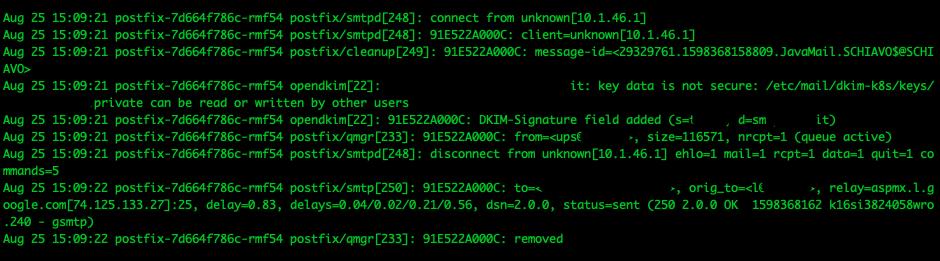
Check the logs — you should see OpenDKIM adding the DKIM signature:
opendkim[22]: 91E522A000C: DKIM-Signature field added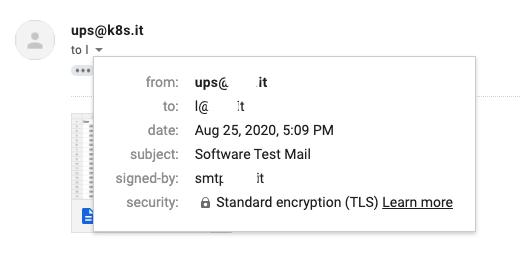
The RequireSafeKeys false option in the OpenDKIM configmap is enabled for testing — tighten that up before calling this production-ready.
Takeaway
Postfix integrates into Kubernetes without major problems. The ConfigMap/Secret pattern works well for mail service configuration — it gives you the flexibility to tune without rebuilding images, which is the only sane approach.
That said — this is a prototype. In a production infrastructure you’d want to work through the security model more carefully, add proper alerting, and think about high availability. But for a personal domain and alerting use case, it runs well.