HPA vs Rate-limit

INTRO
Strange… we are using HPA to increase availability and introducing rate limiting to reduce it?
Well, let’s create the context.
This analysis is based on specific assumptions:
- Cloud environment
- Dynamic infrastructure
- Minimum resources available
HPA
In Kubernetes, a HorizontalPodAutoscaler automatically updates a workload resource (Deployment, StatefulSet) to match demand.
Patterns
| Type | Behaviour |
|---|---|
| Slow and temporary | Daily fluctuations, peaking during the day and troughing at night |
| Rapid and temporary | Short bursts from poorly-behaved downstream services |
| Slow and persistent | Request volume slowly increases as the product sees adoption |
| Rapid and persistent | Abrupt shift from low to high volumes — e.g. called by batch jobs |
Ideal Practice
| Type | Ideal Practice |
|---|---|
| Slow and temporary | HPA should add and remove pods as necessary |
| Rapid and temporary | HPA should NOT modify pod count — leave headroom for brief spikes |
| Slow and persistent | HPA should add and remove pods as necessary |
| Rapid and persistent | Leave headroom; HPA adds pods quickly to restore target utilization |
Rate Limit
A rate limit is the number of API calls an app or user can make within a given time period. If this limit is exceeded — or if CPU or time limits are exceeded — the app may be throttled. Throttled requests fail.
Keep HPA patterns as reference even when designing rate limiting.
GOALS
- Understand how much we can optimize application performance during autoscaling using rate limiting
- Understand how to handle unexpected traffic with rate limiting
Limits
Sometimes legitimate traffic spikes occur. Search engine crawlers (Google bots etc.) generate significant traffic that shouldn’t trigger errors. This is the unexpected traffic case.
Hands-on
Simulation
Test setup:
- Python app calculating Fibonacci sequences
- Fibonacci number: 18500 (CPU-bound)
- Load testing with Gatling
- App CPU-capped: 10mcpu per request, 300mcpu max per pod
- HPA trigger:
keda flask_http_request_duration_seconds_count
$ curl http://xxx/api/fib/18500
8353329688443562486779853158514... etc
Real computation behind each request — no mock responses.
Note on Gatling’s “active users”:
(users alive at previous second)
+ (users started during this second)
- (users terminated during previous second)
This metric is more representative of application stress than simple concurrent requests.
NO AUTOSCALING
First run — 40rps max
rampUsers(10).during(60.seconds),
constantUsersPerSec(10).during(60.seconds),
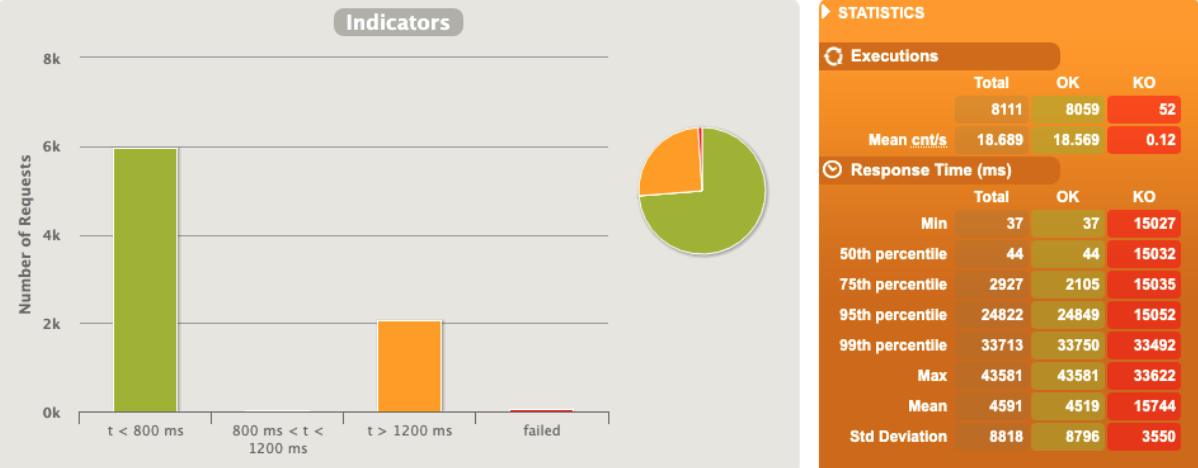
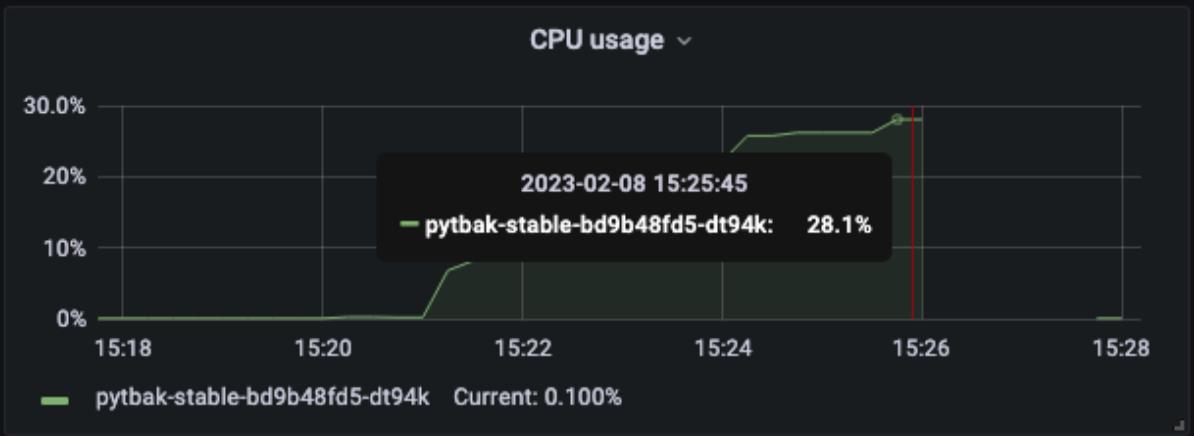
rampUsersPerSec(10).to(40).during(5.minutes)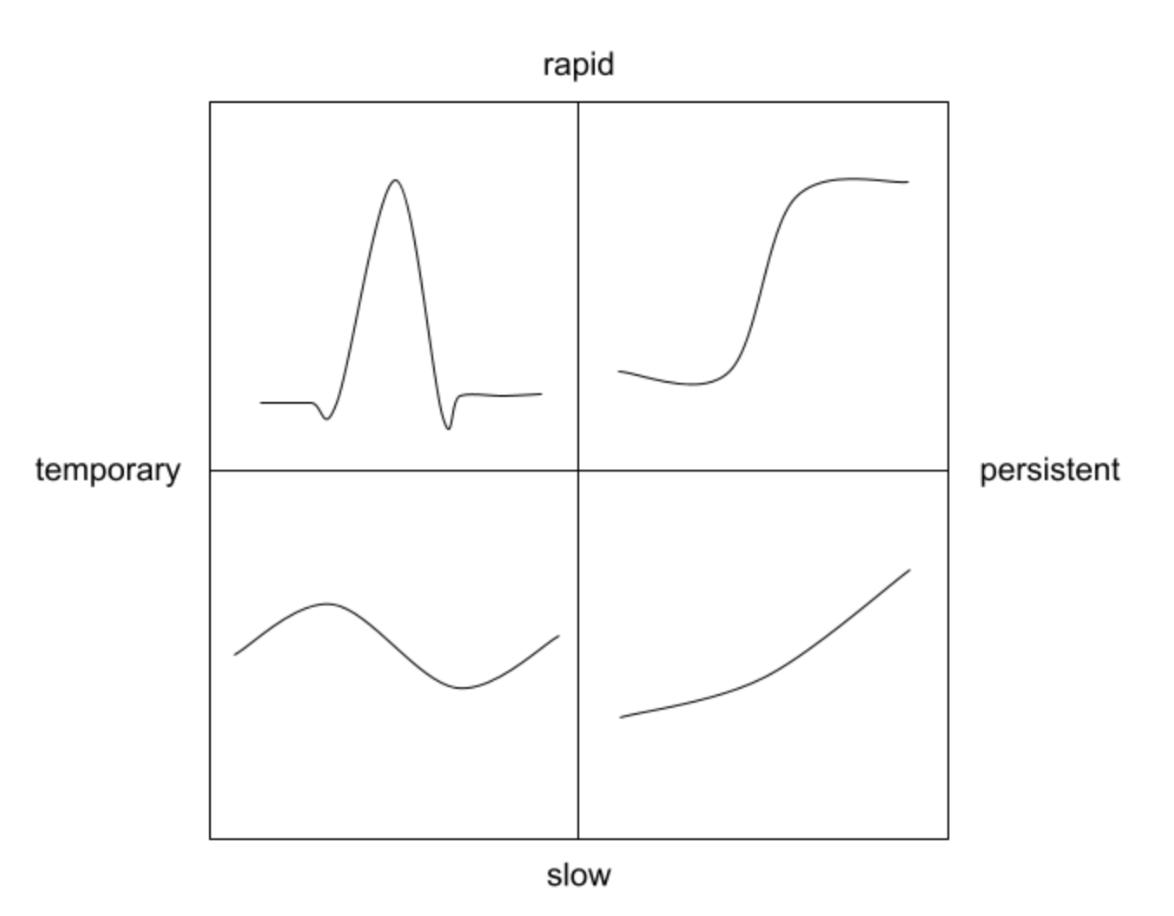
Result: Pod becomes unresponsive at ~33 rps. CPU hit ~28% of the 300mcpu limit. Active users spike after 33 rps.
Second run — 33rps max
rampUsers(10).during(60.seconds),
constantUsersPerSec(10).during(60.seconds),
rampUsersPerSec(10).to(30).during(4.minutes)
Better stability. Maximum sustainable: 33 rps on a single pod.
AUTOSCALING
rampUsers(10).during(60.seconds),
constantUsersPerSec(10).during(60.seconds),
rampUsersPerSec(10).to(99).during(15.minutes)
1 pod start - hpa 33rps - 15 min - 99 max requests
---- Errors --------------------------------------------------------------------
> found 503     8358 (45.83%)
> found 502     5529 (30.32%)
> found 504     4273 (23.43%)
> Request timeout  73 ( 0.40%)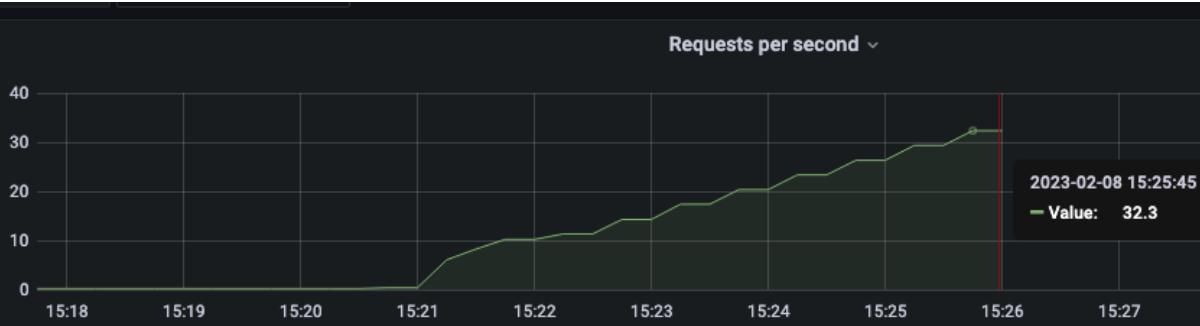
System unresponsive at 72% of test completion.
2 pod start - hpa 33rps - 15 min - 99 max requests
Autoscaler cannot support traffic even with 2 pods. Scaling curve stresses the namespace unpredictably.
1 pod start - hpa 30rps - 15 min - 99 max requests
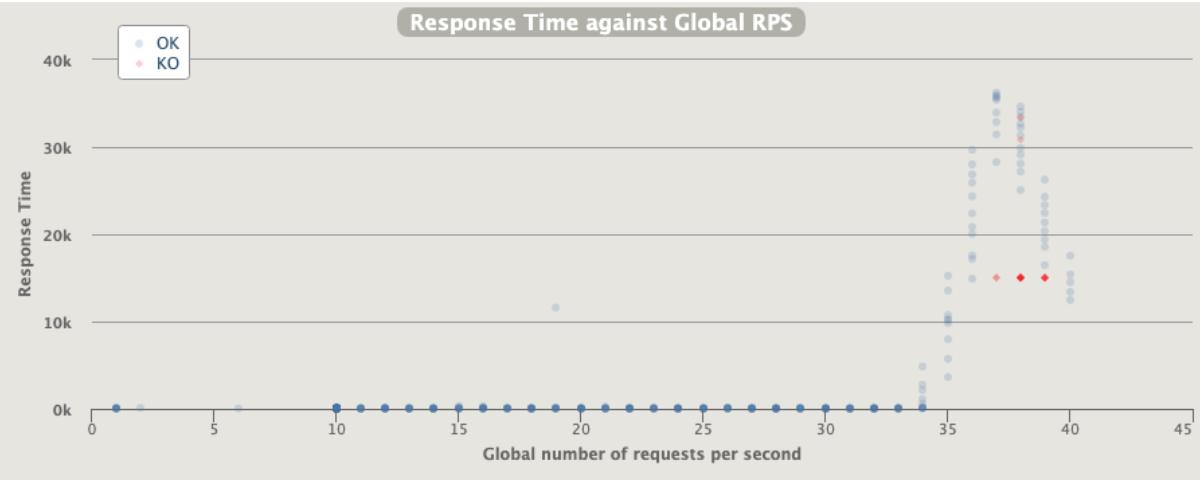
Scaling works but system crashes at end.
1 pod start - hpa 27rps - 15 min - 99 max requests
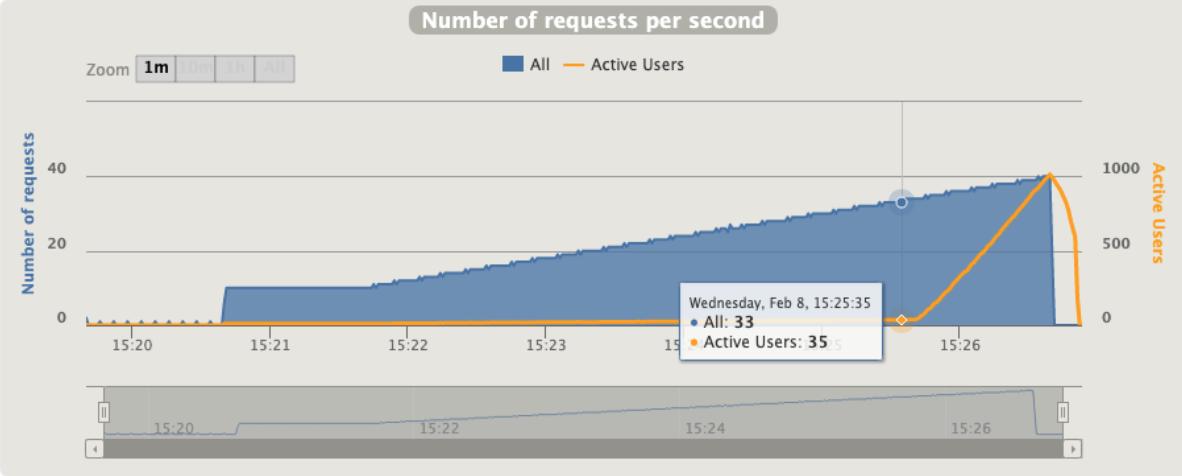
Worse than 30rps. Over-stress causes unpredictable failures.
[optimal] 1 pod start - hpa 24rps - 15 min - 99 max requests
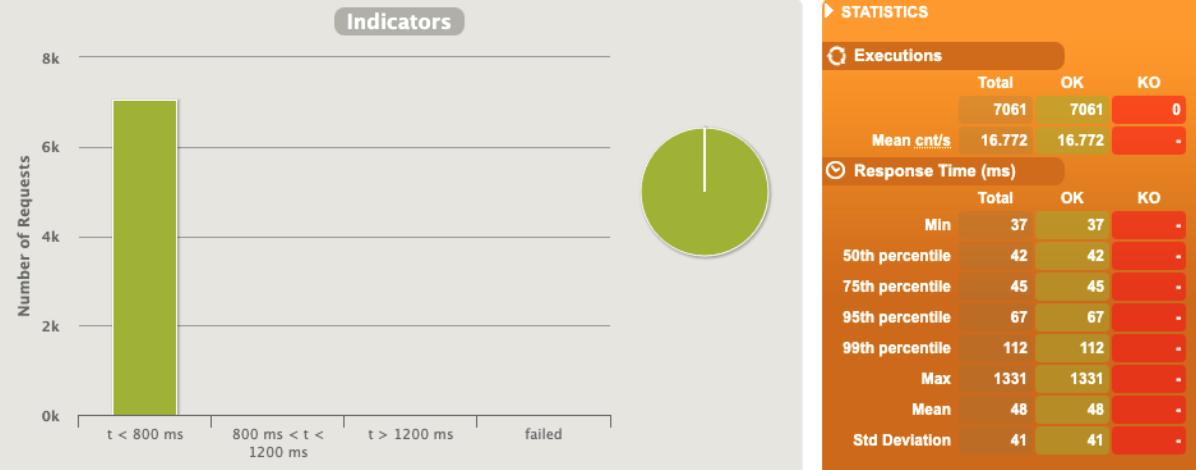
Successful test. 65% of maximum single-pod capacity (24/33) is the safe autoscaling threshold.
1 pod start - hpa 25rps - 15 min - 99 max requests
One rps above optimal. System becomes unstable.
AUTOSCALING + Internal rate limit
See: Application Rate Limiting
[optimal] 1 pod start - hpa 25rps - 15 min - 99 max requests + rate-limit 27
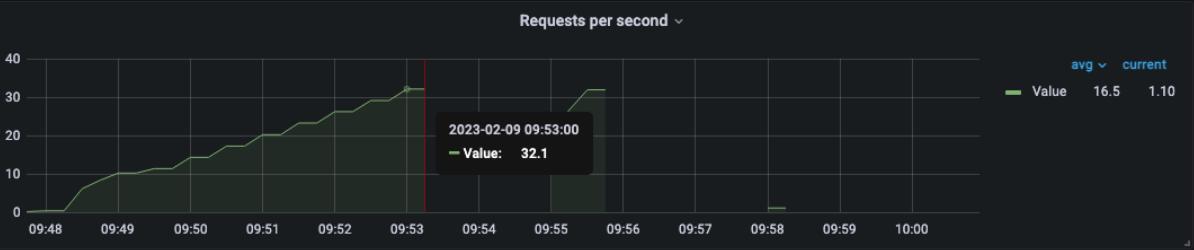
Starting at 25rps (above the 24rps optimal without rate limiting). Errors are 429s, not 5xxs. App doesn’t crash. Slight queue buildup but stable.
1 pod start - hpa 26rps - 15 min - 99 max requests + rate-limit 28
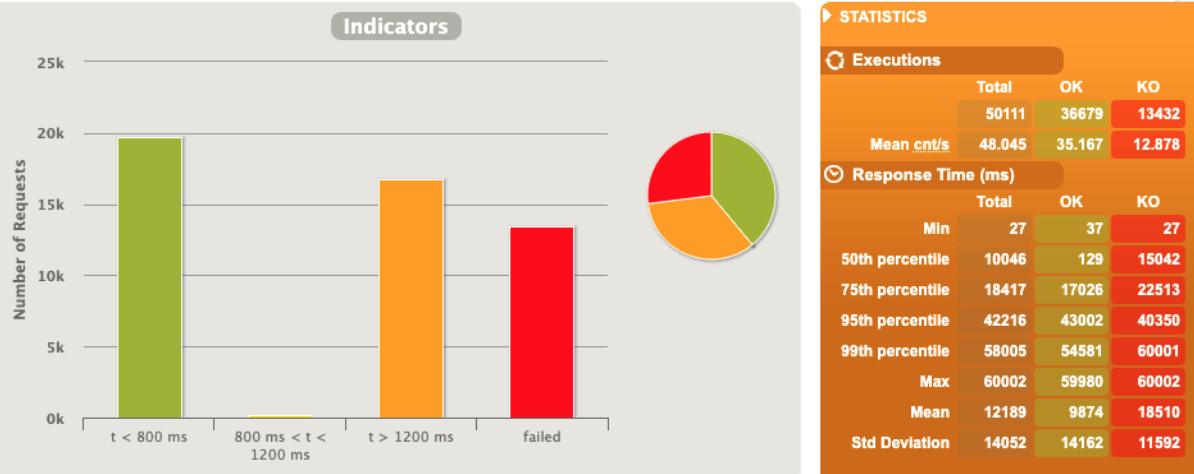
One pod restart observed. Near the edge.
1 pod start - hpa 27rps - 15 min - 99 max requests + rate-limit 29
Fails catastrophically.
AUTOSCALING + Envoy rate limit
1 pod start - hpa 27rps - 15 min - 99 max requests + rate-limit 29 - envoy
Fails.
[optimal] 1 pod start - hpa 26rps - 15 min - 99 max requests + rate-limit 29 - envoy
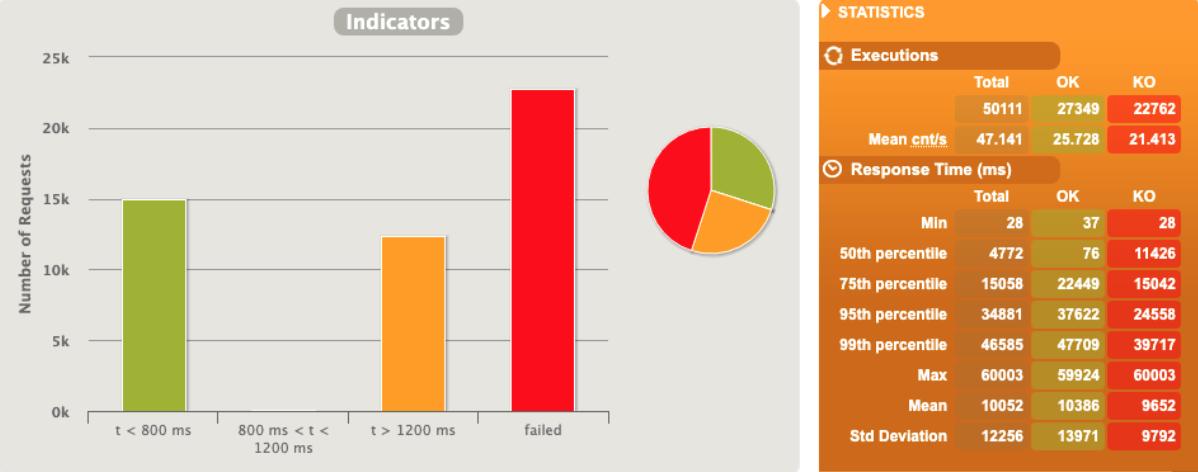
Better than application-embedded rate limiting at the same rps. Envoy manages traffic externally, preventing internal saturation.
Unexpected traffic
Simulating crawler spikes mid-test:
rampUsers(30).during(60.seconds),
constantUsersPerSec(30).during(60.seconds).randomized,
rampUsersPerSec(30).to(82).during(4.minutes),
constantUsersPerSec(82).during(120.seconds).randomized,
rampUsersPerSec(82).to(170).during(10.seconds),  // spike
constantUsersPerSec(82).during(120.seconds).randomized,
rampUsersPerSec(82).to(130).during(20.seconds),
constantUsersPerSec(333).during(2.seconds),       // spike
constantUsersPerSec(333).during(10.seconds),      // sustained spike
3 pod start - hpa 26rps - rate-limit 27 internal
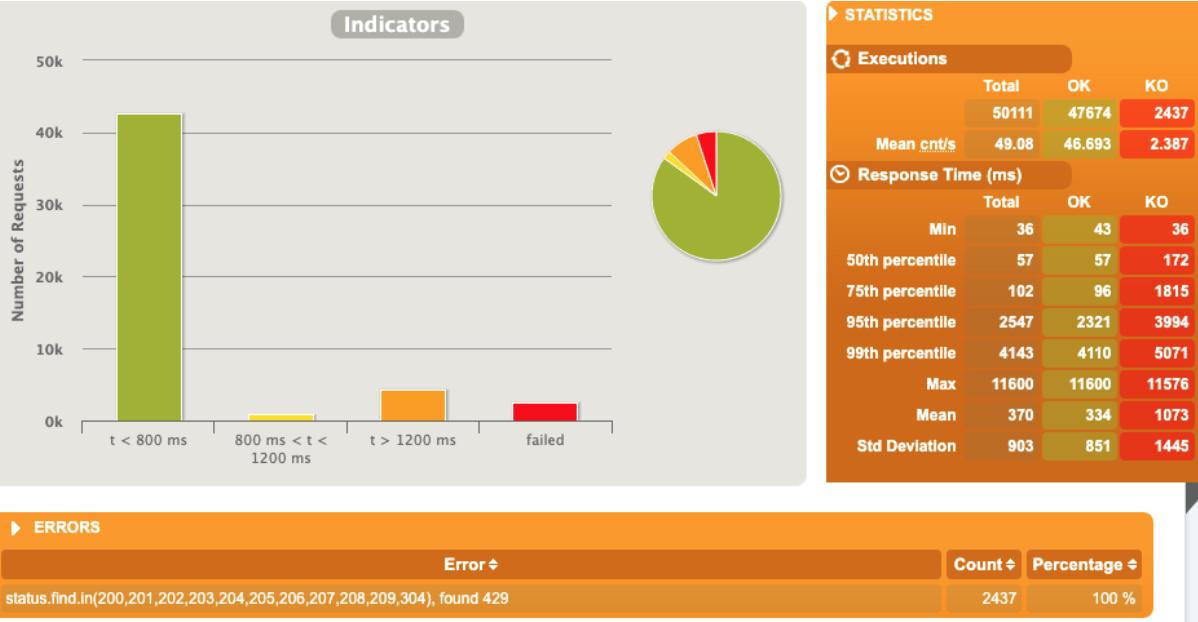
Mix of 429s and 5xxs. System unstable during spikes.
[optimal] 3 pod start - hpa 26rps - rate-limit 27 - envoy
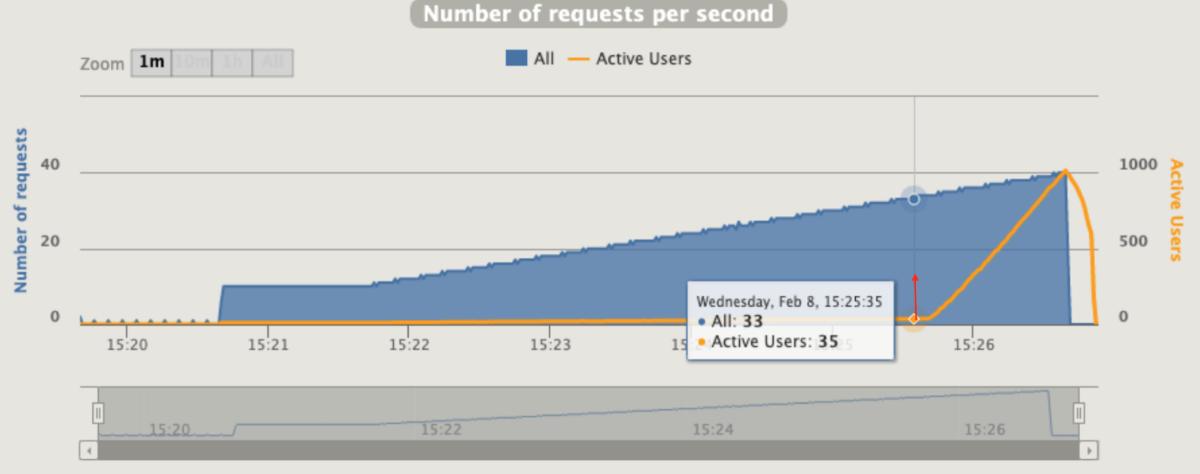
No issues. Envoy absorbs the spikes externally. Python app never sees the overload.
Conclusions
HPA
While a single pod can sustain 33 rps in isolation, autoscaling scenarios reduce this threshold. Applications should operate at ~65% of maximum single-pod capacity before triggering scale events.
The Gatling “active users” metric is more representative of application stress than traditional flask_http_request_duration_seconds_count.
Rate Limit
Can rate limiting increase capacity during autoscaling? No — or minimally. It allows ~5% more rps but increases sensitivity. Rate limiting and HPA fight each other if not carefully tuned.
Can rate limiting handle unexpected traffic? Yes. This is the ideal use case. External rate limiting (Envoy, API Gateway, WAF) outperforms application-embedded rate limiting because it manages traffic before it enters the application’s resource pool.
Both
- Do not use the same metric to drive both HPA and rate limiting
- Both operate on rps thresholds but with different profiling approaches
- Treat them as complementary, not competing
Costs
Unexpected traffic sources:
- ~5%: Internal deployments, batch jobs
- ~95%: External calls via public/private endpoints → WAF or API Gateway rate limiting
As resource optimization increases, corner cases multiply. Evaluate rate limiting concepts carefully against cost-saving goals. A system at 100% capacity has no margin for legitimate traffic spikes.