Homelab, When Small is Big
When I first got into IT, devices ran continuously. My first lab was an impressive tower from 1999 with substantial disk and memory banks, a quality CPU cooled by a massive copper heatsink and a 12cm fan. During the night, those components produced noise comparable to a helicopter. Neighbors complained. I didn’t sleep well.
The lab evolved over the years. Not just for noise reasons, but prioritizing cost-effective hardware that could replicate a simplified production environment. The goals today are very different from 1999:
- Cheap hardware
- Noiseless operation
- TDP under 20w
- 24/7 uptime capability
- Virtualization support
- Kubernetes installation capacity
- Backup solution
- Automation readiness
I want something that covers hobby and experimental needs without requiring raw power. Solution quality matters more than absolute performance.
Hardware
Base: Intel NUC NUC7PJYH
RAM: The manufacturer specs say 8GB maximum. I’m running 16GB — G.Skill Ripjaws SO-DIMM 16GB DDR4-2400Mhz 2x8GB. It just works.
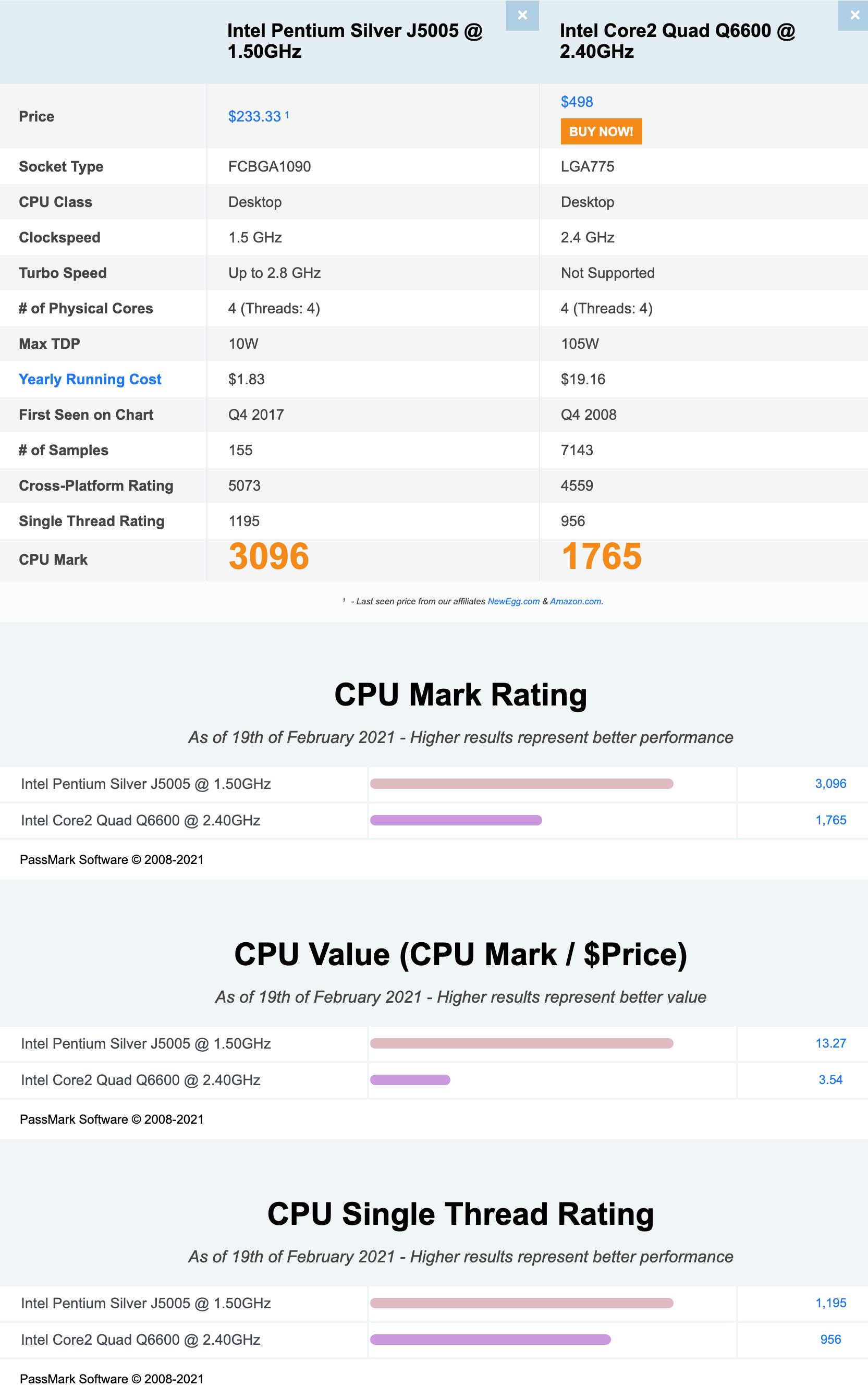
CPU: The J5005 processor offers an optimal TDP/performance ratio compared to older quad-core processors like the Q6600. It’s not a powerhouse, but it doesn’t need to be.
DISK: 250GB OCZ Vertex4 SSD. Good starting point.
Software Stack
Base OS: VMware ESXi 6.7 (free/essential edition)
Why VMware? The virtualization stack provides a crucial abstraction layer. I wrote more about this in the post about Kubernetes and virtualization.
Why version 6.7 specifically? The vmkernel changed in 7.0, and that change broke external network driver imports required for this NUC model. Workarounds exist using USB network adapters with VMware Labs USB drivers, but 6.7 is just simpler.
Building the ESXi image with Realtek network card: You need Windows to identify hardware drivers (in this case, Net55-r8168 from V-Front). ESXi-Customizer-PS rebuilds the image with the right drivers included.
What this setup enables: Packer and Ansible for installation and configuration of VMs. K3s clusters, MicroK8s standalone Kubernetes, multiple virtual machines — all deployable from code.
Current VMs running:
- MicroK8s installation
- Monitoring infrastructure
- Windows Active Directory
- Console VM (ephemeral environment for experiments)
Monitoring
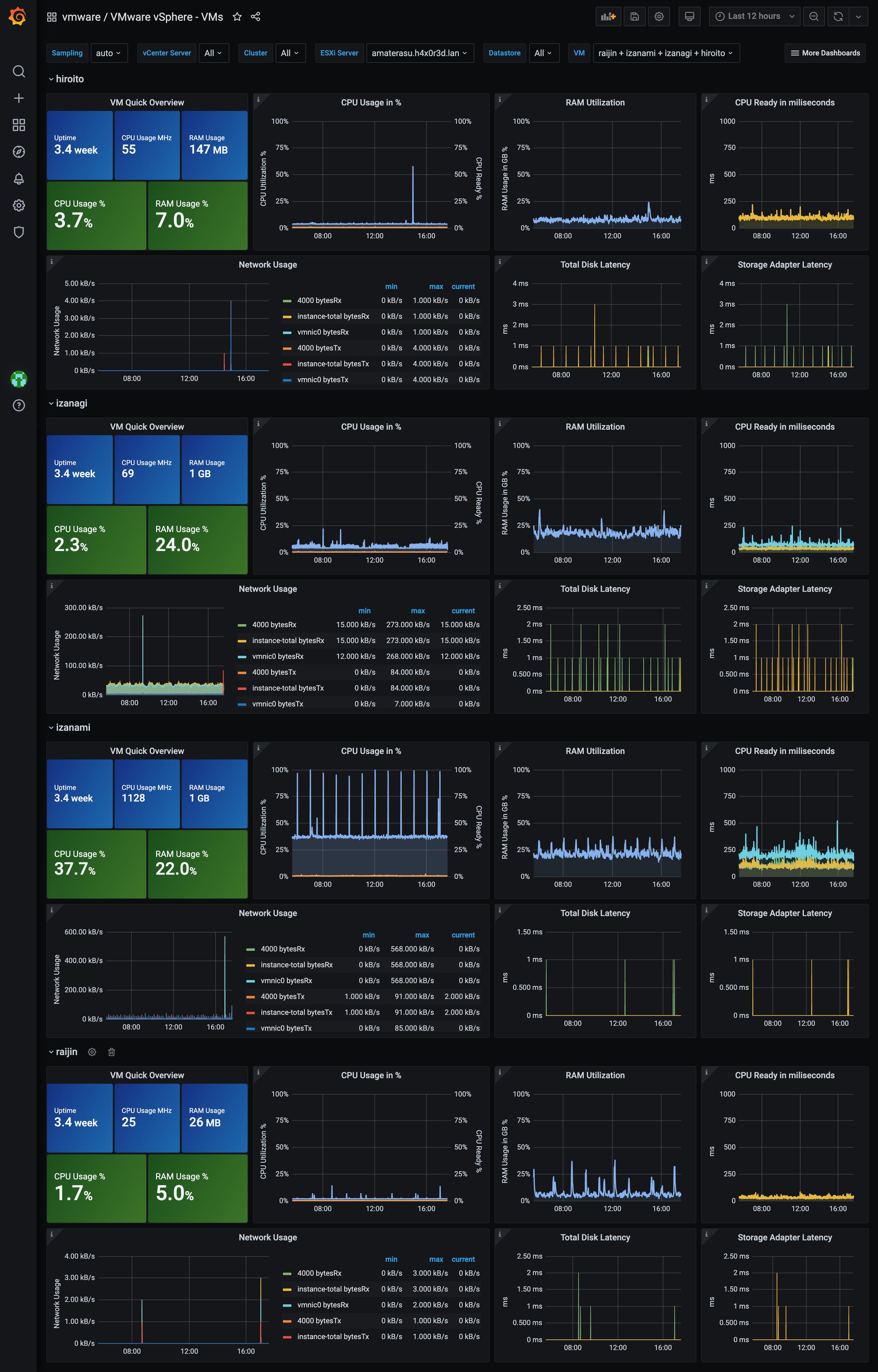
Grafana and InfluxDB handle monitoring, tracking both host and virtual machine metrics:
Backup
Why bother? Even with full automation, having VM snapshots lets me experiment aggressively and roll back when things go wrong. Which they do.
Tool: ghettoVCB. Free, battle-tested for non-production environments, been using it forever.
The script folder structure:
[root@amaterasu:/vmfs/volumes/5eafe677-1260d7e8-2521-94c691a54f7d/script] ls -la
total 2240
-rw-r--r--    1 root     root           577 May  4  2020 email.xml
-rwxr-xr-x    1 root     root         17207 May  4  2020 ghettoVCB-restore.sh
-rw-r--r--    1 root     root           309 May  4  2020 ghettoVCB-restore_vm_restore_configuration_template
-rw-r--r--    1 root     root           356 May  4  2020 ghettoVCB-vm_backup_configuration_template
-rwxr-xr-x    1 root     root         72122 May  4  2020 ghettoVCB.sh
-rwxr-xr-x    1 root     root           404 May 12  2020 init.sh
-rw-r--r--    1 root     root           372 May  4  2020 packer.xml
The init.sh integrates into /etc/rc.local.d/local.sh so it runs automatically on machine startup:
[root@amaterasu:/vmfs/volumes/5eafe677-1260d7e8-2521-94c691a54f7d/script]
cat /etc/rc.local.d/local.sh
#!/bin/sh
# local configuration options

sh -x /vmfs/volumes/amaterasu-datastore/script/init.sh

exit 0
The init script applies the changes needed for ghettoVCB’s cron to work correctly:
#!/bin/bash
cp /vmfs/volumes/amaterasu-datastore/script/email.xml /etc/vmware/firewall/
cp /vmfs/volumes/amaterasu-datastore/script/packer.xml /etc/vmware/firewall/
esxcli network firewall refresh
echo "0 22 * * 6 /vmfs/volumes/amaterasu-datastore/script/ghettoVCB.sh -a -g /vmfs/volumes/amaterasu-datastore/script/ghettoVCB.conf   " >>  /var/spool/cron/crontabs/root
kill $(cat /var/run/crond.pid)
crond
The ghettoVCB config — NFS-based backup to a NAS, 3 rotations, thin disk format:
DISK_BACKUP_FORMAT=thin
VM_BACKUP_ROTATION_COUNT=3
POWER_VM_DOWN_BEFORE_BACKUP=0
ENABLE_HARD_POWER_OFF=0
ITER_TO_WAIT_SHUTDOWN=3
POWER_DOWN_TIMEOUT=5
ENABLE_COMPRESSION=0
VM_SNAPSHOT_MEMORY=0
VM_SNAPSHOT_QUIESCE=0
ALLOW_VMS_WITH_SNAPSHOTS_TO_BE_BACKEDUP=0
ENABLE_NON_PERSISTENT_NFS=1
UNMOUNT_NFS=1
NFS_SERVER=192.168.1.13
NFS_VERSION=nfs
NFS_MOUNT=/export/backup
NFS_LOCAL_NAME=nfs_storage_backup
NFS_VM_BACKUP_DIR=amaterasu
ENABLE_NFS_IO_HACK=1
NFS_IO_HACK_LOOP_MAX=10
NFS_IO_HACK_SLEEP_TIMER=60
SNAPSHOT_TIMEOUT=15
EMAIL_ALERT=0
EMAIL_LOG=1
EMAIL_SERVER=smtp.k8s.it
EMAIL_SERVER_PORT=25
EMAIL_DELAY_INTERVAL=1
EMAIL_USER_NAME=
EMAIL_USER_PASSWORD=
WORKDIR_DEBUG=0
VM_SHUTDOWN_ORDER=
VM_STARTUP_ORDER=
Weekly backup run log confirms everything works:
2021-02-13 22:00:00 -- info: ============================== ghettoVCB LOG START ==============================
2021-02-13 22:00:01 -- info: CONFIG - USING GLOBAL GHETTOVCB CONFIGURATION FILE = /vmfs/volumes/amaterasu-datastore/script/ghettoVCB.conf
2021-02-13 22:00:01 -- info: CONFIG - VERSION = 2019_01_06_4
2021-02-13 22:27:54 -- info: ###### Final status: All VMs backed up OK! ######
2021-02-13 22:27:54 -- info: ============================== ghettoVCB LOG END ================================
Pricing
- NUC7PJYH: ~160€
- G.Skill Ripjaws SO-DIMM 16GB DDR4-2400Mhz 2x8GB: ~60€
- 250GB SSD: ~40€
Total: ~260€
Not as cheap as a Raspberry Pi 4, but this delivers roughly 10x the performance with a complete server experience, proper virtualization, and all the learning opportunities that come with it. For what I’m doing — running real Kubernetes workloads, testing infrastructure patterns, building things I actually care about — it’s the right tool.