Building a Scalable Image CDN with MinIO, imgproxy, and Cloudflare

Intro
In today’s digital landscape, efficiently serving images is critical for website performance. Users expect fast-loading, responsive websites, and images often account for the majority of a page’s weight. In this article, I’ll walk you through building a powerful, scalable image CDN using open-source tools that you can deploy in your own infrastructure.
The Architecture
Our image CDN consists of three main components:
- MinIO — An S3-compatible object storage backend that stores original images
- imgproxy — A fast and secure image processing service that resizes and optimizes images on-the-fly
- Cloudflare — Providing CDN capabilities through Cloudflare Tunnel
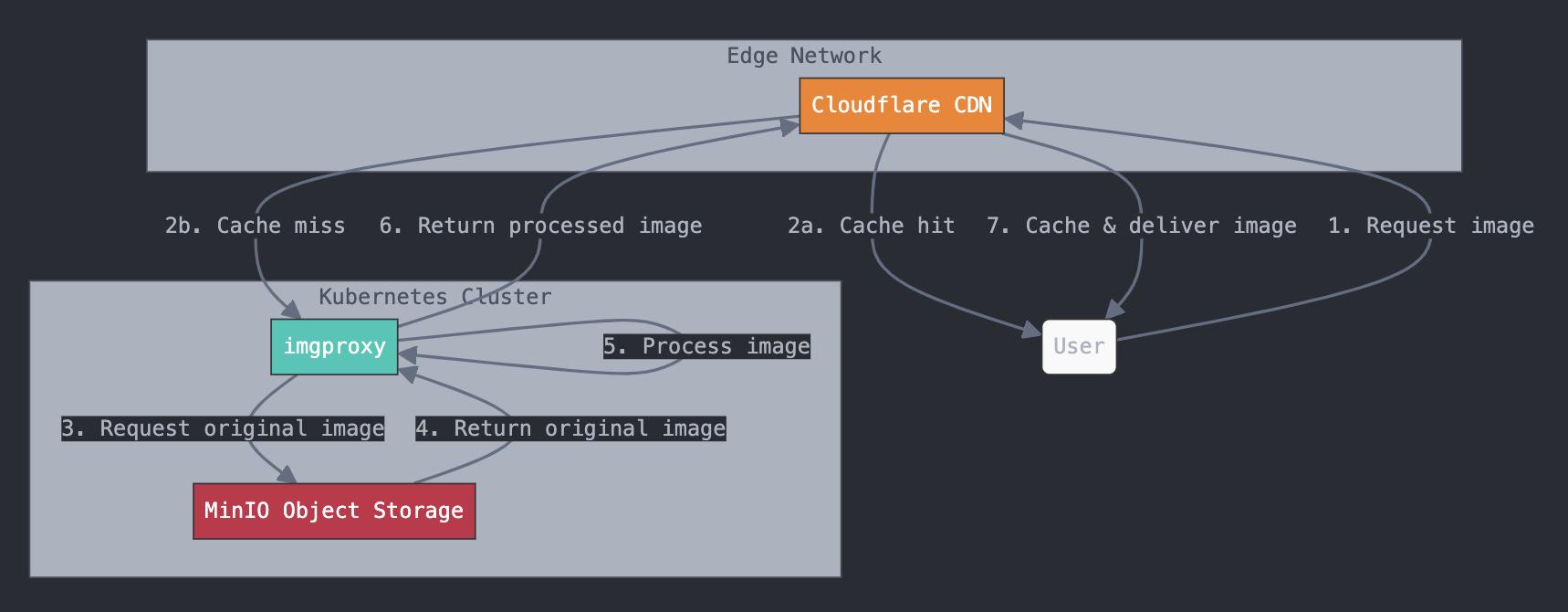
This architecture gives us several advantages:
- On-demand image resizing and optimization
- Edge caching for faster global delivery
- Secure, private storage of original assets
- High scalability and cost-effectiveness
How It Works
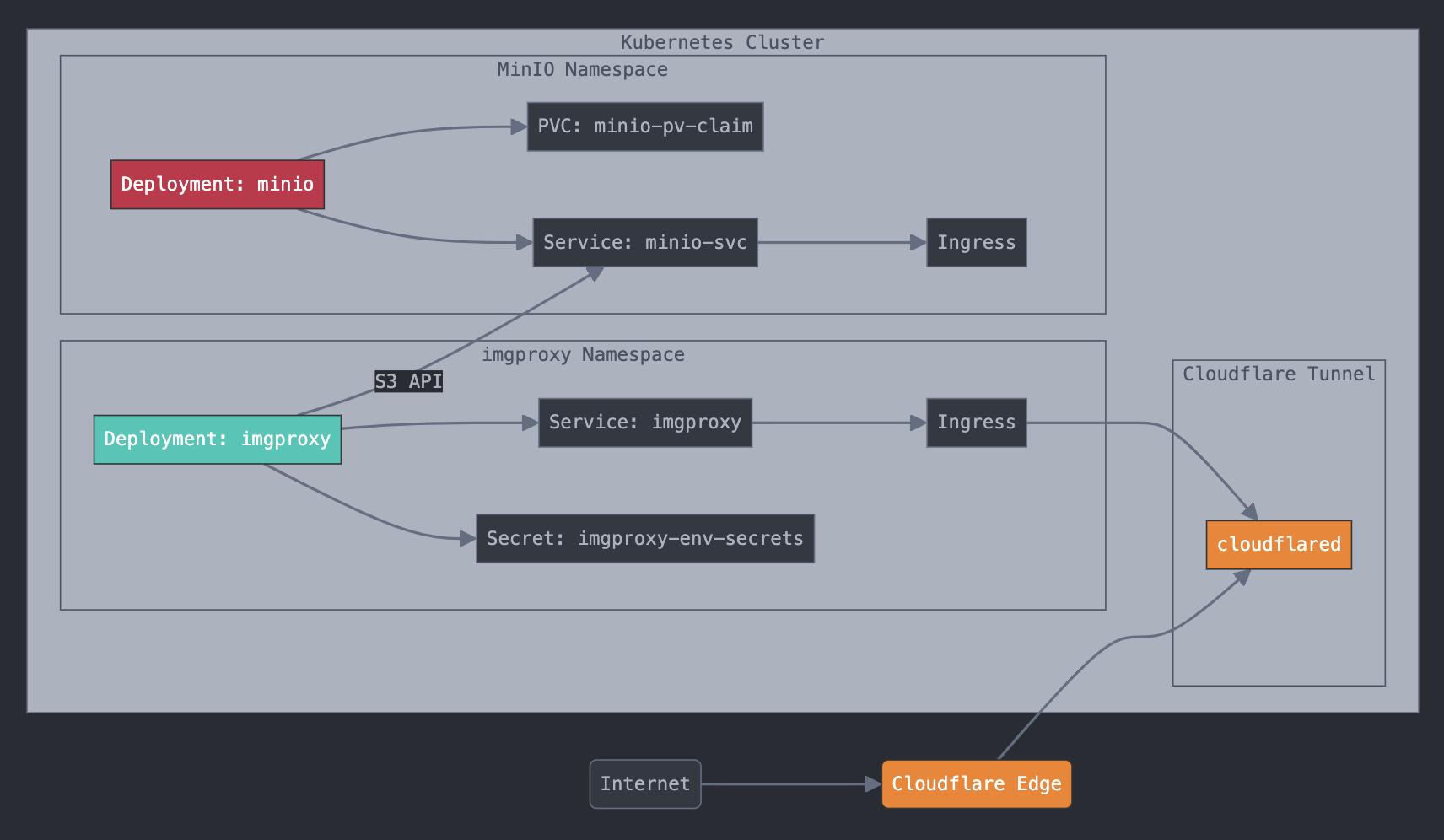
The request flow:
- User requests an image via CDN URL
- Cloudflare returns cached copy if available
- Cache miss routes the request to imgproxy
- imgproxy retrieves the original from MinIO
- imgproxy processes per URL parameters (resize, format, quality)
- Processed image returns through Cloudflare and caches at the edge
If it isn’t cached, it can’t break. If it isn’t there, we process it once.
Setting Up MinIO
Deploy MinIO as a Kubernetes Deployment with persistent storage:
apiVersion: apps/v1
kind: Deployment
metadata:
  name: minio-deployment
  namespace: minio
spec:
  replicas: 1
  selector:
    matchLabels:
      app: minio
  strategy:
    type: Recreate
  template:
    metadata:
      labels:
        app: minio
    spec:
      volumes:
        - name: storage
          persistentVolumeClaim:
            claimName: minio-pv-claim
      containers:
        - name: minio
          image: minio/minio:latest
          args:
            - server
            - /storage
          env:
            - name: MINIO_ACCESS_KEY
              value: "your-access-key"
            - name: MINIO_SECRET_KEY
              value: "your-secret-key"
            - name: MINIO_DOMAIN
              value: minio-ingress
          ports:
            - containerPort: 9000
          volumeMounts:
            - name: storage
              mountPath: "/storage"
          resources:
            requests:
              memory: "256Mi"
              cpu: "100m"
            limits:
              memory: "512Mi"
              cpu: "500m"
Create the PVC:
apiVersion: v1
kind: PersistentVolumeClaim
metadata:
  namespace: minio
  name: minio-pv-claim
spec:
  storageClassName: microk8s-hostpath
  accessModes:
    - ReadWriteOnce
  resources:
    requests:
      storage: 20Gi
Expose via Service:
apiVersion: v1
kind: Service
metadata:
  name: minio-svc
  namespace: minio
spec:
  ports:
    - name: http
      port: 9000
      targetPort: 9000
    - name: console
      port: 9001
      targetPort: 9001
  selector:
    app: minio
  type: ClusterIP
Setting Up imgproxy
Install via Helm:
helm repo add imgproxy https://imgproxy.github.io/imgproxy-helm
helm install imgproxy imgproxy/imgproxy -n imgproxy --create-namespace
Configure the environment variables for MinIO connectivity:
env:
  IMGPROXY_USE_S3: "true"
  IMGPROXY_S3_ENDPOINT: "http://minio-svc.minio.svc.cluster.local:9000"
  IMGPROXY_S3_REGION: "local"
  AWS_ACCESS_KEY_ID: "your-access-key"
  AWS_SECRET_ACCESS_KEY: "your-secret-key"
  IMGPROXY_USE_S3_FORCE_PATH_STYLE: "true"
  IMGPROXY_ALLOW_UNSAFE_URLS: "true"
  IMGPROXY_QUALITY: "80"
  IMGPROXY_MAX_SRC_RESOLUTION: "16.8"
  IMGPROXY_STRIP_METADATA: "true"
  IMGPROXY_STRIP_COLOR_PROFILE: "true"
Setting Up Cloudflare as CDN
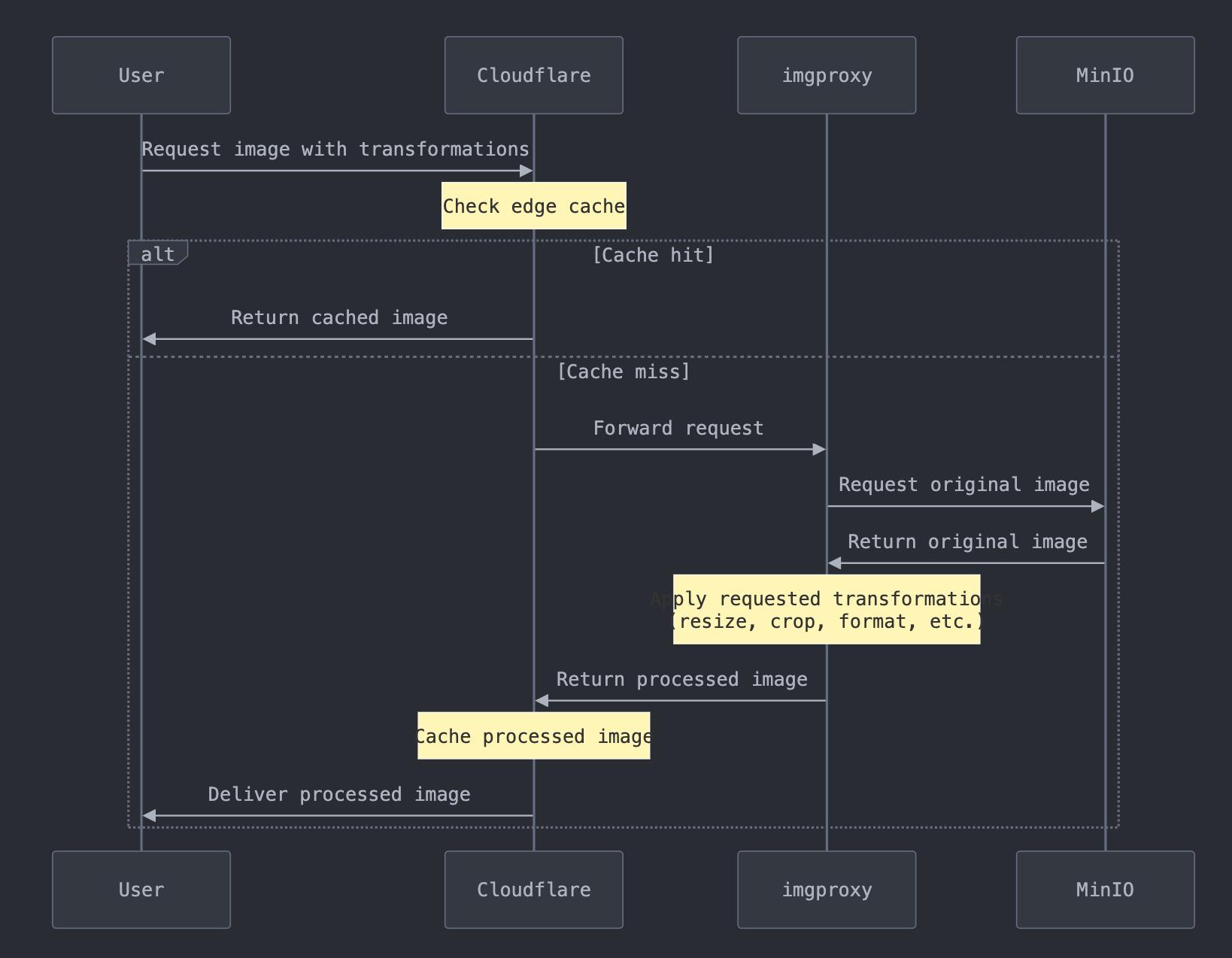
- Deploy cloudflared as a Kubernetes Deployment in your cluster
- Create a Cloudflare Tunnel pointing to imgproxy’s ClusterIP service
- Add a DNS record in Cloudflare pointing to your tunnel hostname
Usage Examples
Image transformation via URL parameters:
# Resize to 300x200
https://images.example.com/unsafe/resize:300:200/plain/s3://images/product.jpg

# Resize and crop square
https://images.example.com/unsafe/resize:300:300:fill/plain/s3://images/product.jpg

# Convert to WebP
https://images.example.com/unsafe/format:webp/plain/s3://images/product.jpg

# Resize + WebP in one request
https://images.example.com/unsafe/resize:800/format:webp/plain/s3://images/hero.jpg
Security Considerations
- Use proper MinIO credentials — never
PLACEHOLDERin production - Enable imgproxy URL signing to prevent URL tampering: set
IMGPROXY_KEYandIMGPROXY_SALT - Leverage Cloudflare WAF and rate limiting on the CDN hostname
- Configure CORS on MinIO for cross-domain image serving
- Keep imgproxy behind ClusterIP only — Cloudflare Tunnel is the only ingress path
Performance Optimization
- Set aggressive Cloudflare Cache TTLs (1 year for immutable images)
- Enable Cloudflare Polish to compress images at the edge on top of imgproxy’s processing
- Set
IMGPROXY_QUALITY: 80— imperceptible quality loss, 20-40% size reduction - Enable Brotli compression in Cloudflare for non-image assets
Monitoring and Maintenance
imgproxy exposes Prometheus metrics at /metrics. Add a ServiceMonitor if you’re running the Prometheus Operator:
apiVersion: monitoring.coreos.com/v1
kind: ServiceMonitor
metadata:
  name: imgproxy
  namespace: imgproxy
spec:
  selector:
    matchLabels:
      app: imgproxy
  endpoints:
    - port: metrics
      interval: 30s
Key metrics to watch:
imgproxy_requests_total— throughputimgproxy_request_duration_seconds— latencyimgproxy_errors_total— error rate
Conclusion
Building a custom image CDN with MinIO, imgproxy, and Cloudflare gives you full control, zero vendor lock-in, and serious performance. The stack handles on-demand resizing, format conversion, quality optimization, and global edge caching — all in one pipeline.
Particularly useful for e-commerce platforms, sites with user-generated content, or any project with a large image library that needs flexible sizing. Once it’s running, Cloudflare’s cache does the heavy lifting and imgproxy only works when it has to.